Voxelate
What is a Voxel ? 🧊
In computer graphics, a
voxel, also known as a 3D pixel, is a 3D cube located on a three-dimensional grid and used to construct 3D models.
Similar to a pixel in a 2D image, a voxel occupies a specific location inside a
3D grid and has a color value assigned to it.
All individual voxels are the same size; however, voxels can be combined within the same grid at different positions and with different colors to create what is known as a voxel model.
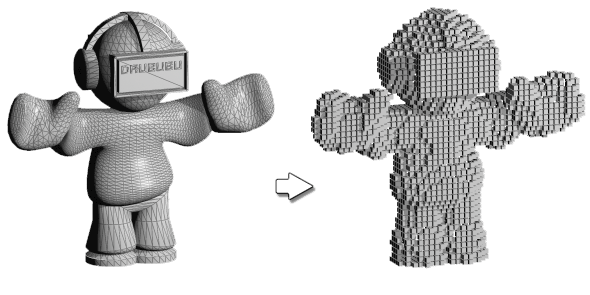 What is a voxel ?
From the left, Original shape · Voxelated shape
In addition, a voxel is used as the smallest unit composing an architectural space, because
voxels have no deadspace and can be applied to architectural purposes in a reasonable and consistent manner.
For this reason, voxels are used in many architectural offices. The architectural process below illustrates how
voxelization is applied to a building.
This article covers the automation of voxelization, how a given shape is transformed into a voxelated shape, and how information can be embedded within each voxel.
 mvrdv's RED7
3D grid & conditions map
First,
grids must be created, and creating a grid requires the bounding box of the given shape. The angle of the bounding box is set to face the sun, as shown in
picture 4 above.
Using the X and Y segments of the bounding box facing the sun, a 3D voxel grid of the desired size that fully fills the bounding box is obtained.
Each voxel is then tested against the given shape in order to
filter only the voxel that is inside the shape.
This grid of voxels can be represented as a
List, one of Python's data structures. The List data structure can express
multi-dimensional data.
A simple example is examined below.
The simple conditions are as follows:
① voxel size: 2.0 ② given shape: sphere that radius: 20.0. As mentioned earlier, the last picture below shows the voxel data structure represented as a List in Python.
A value of
0 denotes empty voxels, and a value of
1 denotes filled voxels.
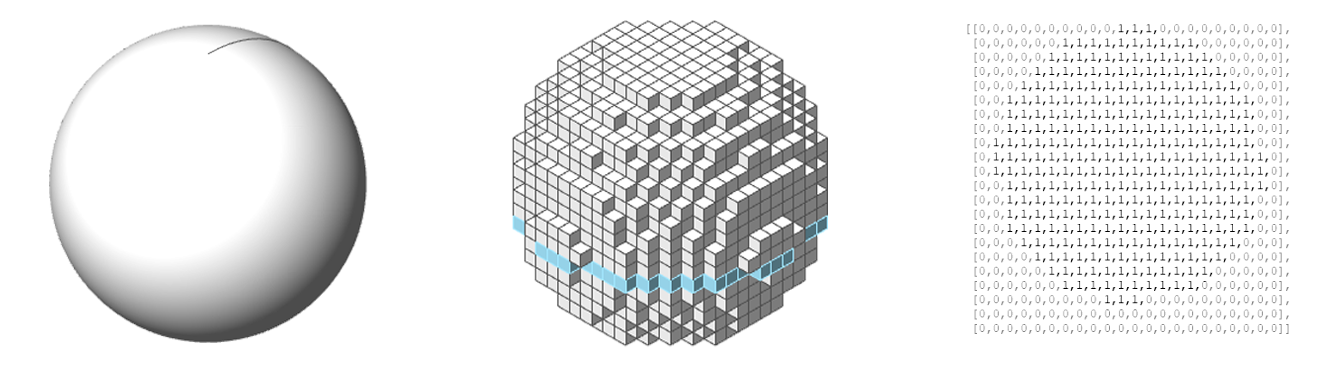 3D grid & conditions map
From the left, Given sphere · Voxelated sphere · Conditions map(9th voxels grid)
Determining the voxel's condition
The condition of each voxel can now be determined from the available data.
Examples include
interior voxels, exterior voxels, corner voxels, and roof voxels, among others.
    def __get_voxels_condition_list(self):
        inside_grid_centroid_integer = [int(b) for b in self.inside_grid_centroid]
        voxel_3d_list = self.__get_reshaped_list(inside_grid_centroid_integer, *self.cols)


        roof_3d_list = self.__get_default_3d_list()
        exterior_3d_list = self.__get_default_3d_list()
        exterior_both_3d_list = self.__get_default_3d_list()
        exterior_corner_3d_list = self.__get_default_3d_list()
        exterior_corner_u_3d_list = self.__get_default_3d_list()
        exterior_corner_o_3d_list = self.__get_default_3d_list()

        for zi, z_list in enumerate(voxel_3d_list):
            prev_zi = (zi - 1) % len(voxel_3d_list)
            next_zi = (zi + 1) % len(voxel_3d_list)

            for yi, y_list in enumerate(z_list):
                prev_yi = (yi - 1) % len(z_list)
                next_yi = (yi + 1) % len(z_list)

                for xi, x in enumerate(y_list):
                    prev_x = bool(y_list[(xi - 1) % len(y_list)])
                    next_x = bool(y_list[(xi + 1) % len(y_list)])
                    back_x = bool(z_list[prev_yi][xi])
                    frnt_x = bool(z_list[next_yi][xi])

                    exterior_count = [prev_x, next_x, back_x, frnt_x].count(False)

                    is_roof = bool(x) and not bool(voxel_3d_list[next_zi][yi][xi])
                    is_exterior_both = bool(x) and (not prev_x and not next_x) or (not back_x and not frnt_x)
                    is_exterior = bool(x) and any([not prev_x, not next_x, not back_x, not frnt_x]) and not is_exterior_both
                    is_exterior_corner = bool(x) and exterior_count == 2 and not is_exterior_both
                    is_exterior_corner_u = bool(x) and exterior_count == 3
                    is_exterior_corner_o = bool(x) and exterior_count == 4

                    if is_roof:
                        roof_3d_list[zi][yi][xi] = 1
                    if is_exterior:
                        exterior_3d_list[zi][yi][xi] = 1
                    if is_exterior_both:
                        exterior_both_3d_list[zi][yi][xi] = 1
                    if is_exterior_corner:
                        exterior_corner_3d_list[zi][yi][xi] = 1
                    if is_exterior_corner_o:
                        exterior_corner_o_3d_list[zi][yi][xi] = 1
                    if is_exterior_corner_u:
                        exterior_corner_u_3d_list[zi][yi][xi] = 1

        interior_3d_list = self.__get_default_3d_list()
        for zi, (z_list, e_list) in enumerate(zip(voxel_3d_list, exterior_3d_list)):
            for yi, (z, e) in enumerate(zip(z_list, e_list)):
                for xi, (zx, ex) in enumerate(zip(z, e)):
                    interior_3d_list[zi][yi][xi] = zx - ex

        grid_3d_list = self.__get_reshaped_list(self.grid, *self.cols)

        return (
            voxel_3d_list,
            grid_3d_list,
            roof_3d_list,
            exterior_3d_list,
            exterior_both_3d_list,
            exterior_corner_3d_list,
            exterior_corner_o_3d_list,
            exterior_corner_u_3d_list,
            interior_3d_list
        )
To determine the ROOF voxel, it is sufficient to
check the condition of the upper voxel.
Likewise, to determine the CORNER voxel, the previous, next, front, and back voxels are checked.
The diagram below shows how the red voxels are identified as CORNER voxels. The link above provides the detailed code for determining the voxel condition.
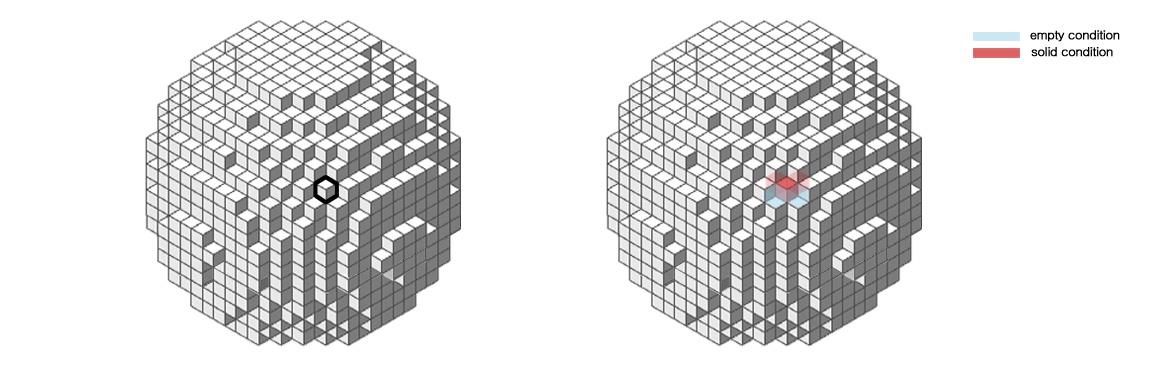 Determining the voxel's condition
From the left, Target voxel · Check surround voxel conditions
Voxel unit matching by condition
Several predefined VoxelUnits can be matched according to the condition of each voxel, as determined from the conditions map.
A unit suitable for the desired voxel size can be designed and applied, and the voxel size can also be
resized as needed.
For voxel matching, a
rotation function is also supported, computed from the angle of the voxel.
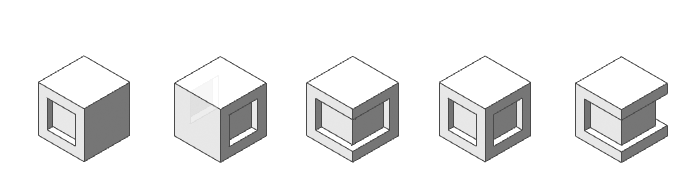 VoxelUnits
From the left, Exterior · Exterior both · Exterior corner · Exterior corner O · Exterior corner U
    class VoxelUnits:
        def __init__(self, exterior_unit, exterior_both_unit, exterior_corner_unit, exterior_corner_o_unit, exterior_corner_u_unit):
            self.unit_bounding_box = gh.BoundingBox(exterior_unit, WORLD_XY).box
            self.exterior_unit_centroid = gh.Volume(self.unit_bounding_box).centroid

            self.voxel_face_edges = gh.DeconstructBrep(self.unit_bounding_box.ToBrep().Faces[0].ToBrep()).edges
            self.scale_factor = self.voxel_size / self.voxel_face_edges[0].GetLength()

            self.rotated_exterior_unit = self.__get_scaled_unit(exterior_unit)
            self.rotated_exterior_both_unit = self.__get_scaled_unit(exterior_both_unit)
            self.rotated_exterior_corner_unit = self.__get_scaled_unit(exterior_corner_unit)
            self.rotated_exterior_corner_u_unit = self.__get_scaled_unit(exterior_corner_u_unit)
            self.rotated_exterior_corner_o_unit = self.__get_scaled_unit(exterior_corner_o_unit)

        def __get_joined_mesh(self, unit):
            return gh.MeshJoin(rg.Mesh.CreateFromBrep(unit, rg.MeshingParameters(0)))

        def __get_rotated_unit(self, unit):
            return gh.Rotate(
                self.__get_joined_mesh(unit),
                self.converted_sun_facing_angle,
                self.exterior_unit_centroid
            ).geometry

        def __get_scaled_unit(self, unit):
            return gh.Scale(
                self.__get_rotated_unit(unit),
                self.exterior_unit_centroid,
                self.scale_factor
            ).geometry if self.is_needed_resize else self.__get_rotated_unit(unit)
Finally, the article concludes with several examples in which each of the VoxelUnits above is applied. Further details are available at the
link.
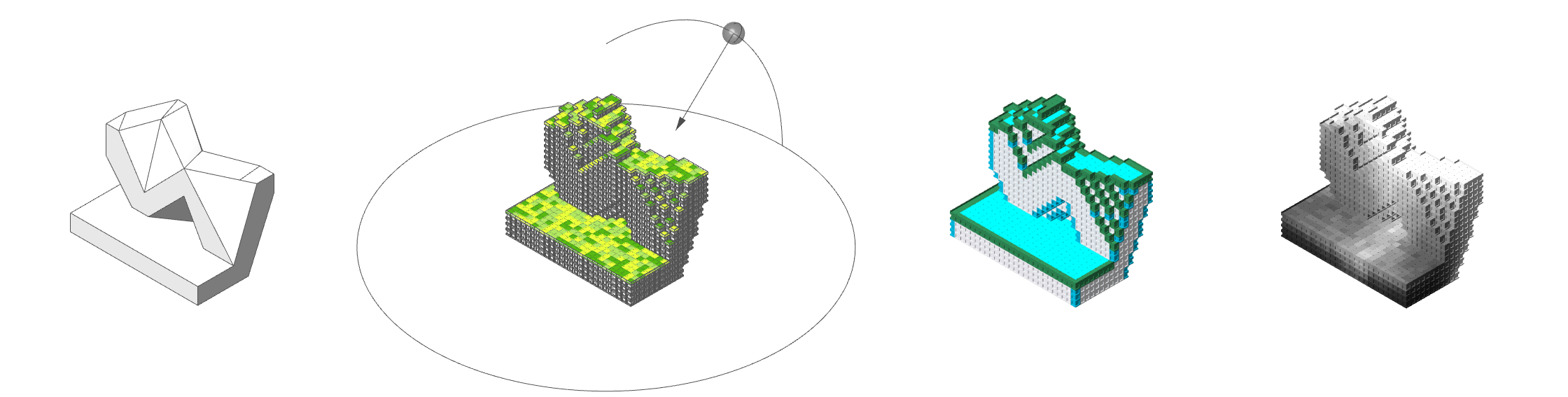 RED7
RED7
From the left, Given shape · Matched VoxelUnits · Visualized each voxel's condition · Shades of voxelated shape
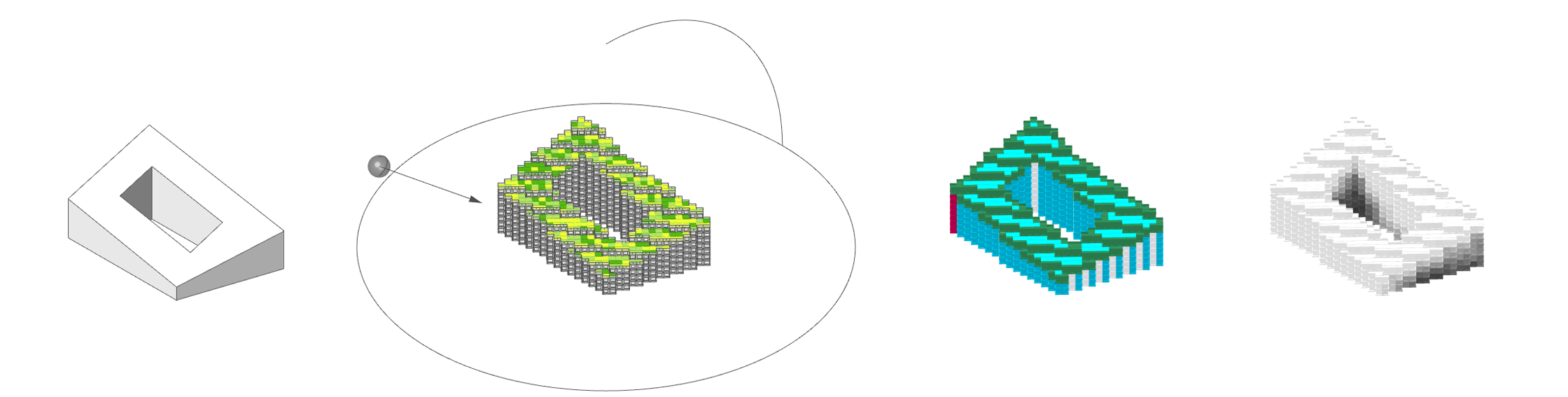 79&PARK
From the left, Given shape · Matched VoxelUnits · Visualized each voxel's condition · Shades of voxelated shape
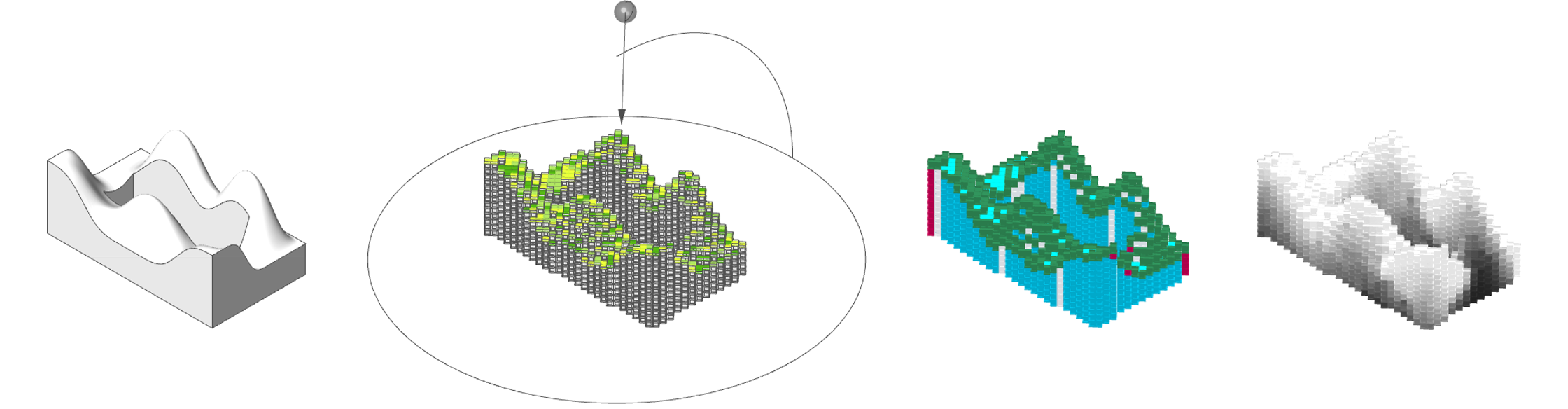 KING TORONTO
From the left, Given shape · Matched VoxelUnits · Visualized each voxel's condition · Shades of voxelated shape
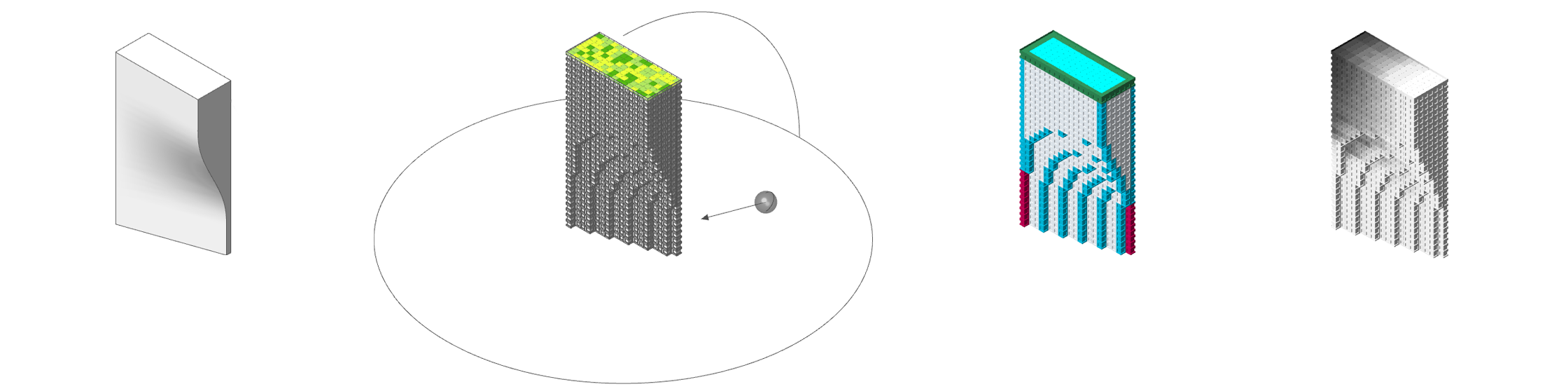 VANCOUVER HOUSE
From the left, Given shape · Matched VoxelUnits · Visualized each voxel's condition · Shades of voxelated shape