Triangle Menu-Aim
- The Problem
-
In interfaces with densely packed interactive elements,
moving the cursor diagonally from a node to its tooltip (or submenu) often causes
the cursor to pass over other nodes along the way.
Each crossed node fires a
mouseenterevent, replacing the intended tooltip with an unrelated one. The result is a frustrating flicker effect. - This is exactly the situation that arises in latentspace.js, the D3.js post map on this blog. Hundreds of nodes float in a small viewport. When a user hovers a node and wants to click its tooltip, the cursor inevitably crosses neighboring nodes, breaking the hover state before reaching the target.
- Amazon's Mega Menu and the Triangle Trick
- Amazon solved a nearly identical problem in their mega dropdown menu around 2013. When a user hovers a top-level category, a large submenu panel appears to the side. Moving the cursor toward the panel requires a diagonal motion, which crosses other menu items and triggers their submenus instead.
-
The solution: construct an invisible triangle from the current cursor position
to the two far corners of the open submenu.
As long as the cursor remains inside this triangle,
the system assumes the user is heading toward the submenu and suppresses any new hover events.
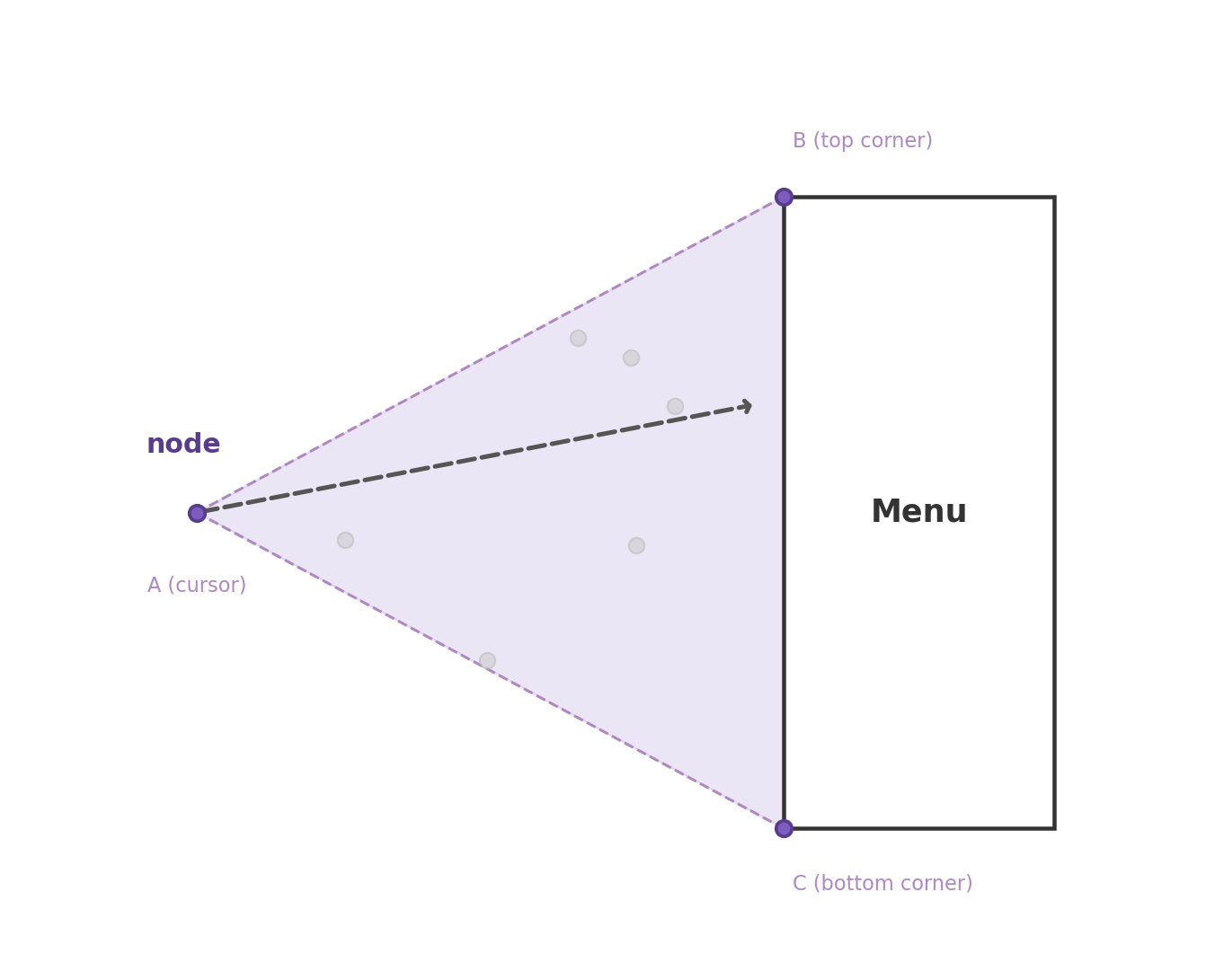
The cursor (apex) and the two corners of the tooltip form a triangle. While the cursor stays inside this triangle, hover changes on intermediate nodes are suppressed. - This pattern is sometimes called the menu-aim pattern, and it can be seen as an extension of Fitts's Law: the effective target area is enlarged by considering the user's movement direction, not just the target's static bounding box.
- Point-in-Triangle Test
-
The core math behind the triangle trick is the point-in-triangle test using the sign of cross products.
Given a triangle with vertices \(A\), \(B\), \(C\) and a query point \(P\),
compute the following three cross product signs:
\[
d_1 = (P - A) \times (B - A)
\]
\[
d_2 = (P - B) \times (C - B)
\]
\[
d_3 = (P - C) \times (A - C)
\]
where the 2D cross product of vectors \(\mathbf{u} = (u_x, u_y)\) and \(\mathbf{v} = (v_x, v_y)\) is: \[ \mathbf{u} \times \mathbf{v} = u_x v_y - u_y v_x \] -
If all three values \(d_1, d_2, d_3\) share the same sign (all positive or all negative),
the point \(P\) lies inside the triangle.
If any sign differs, the point is outside.
This works because traversing the triangle edges in order (A → B → C) creates a consistent winding direction. A point inside the triangle will always be on the same side of every edge.
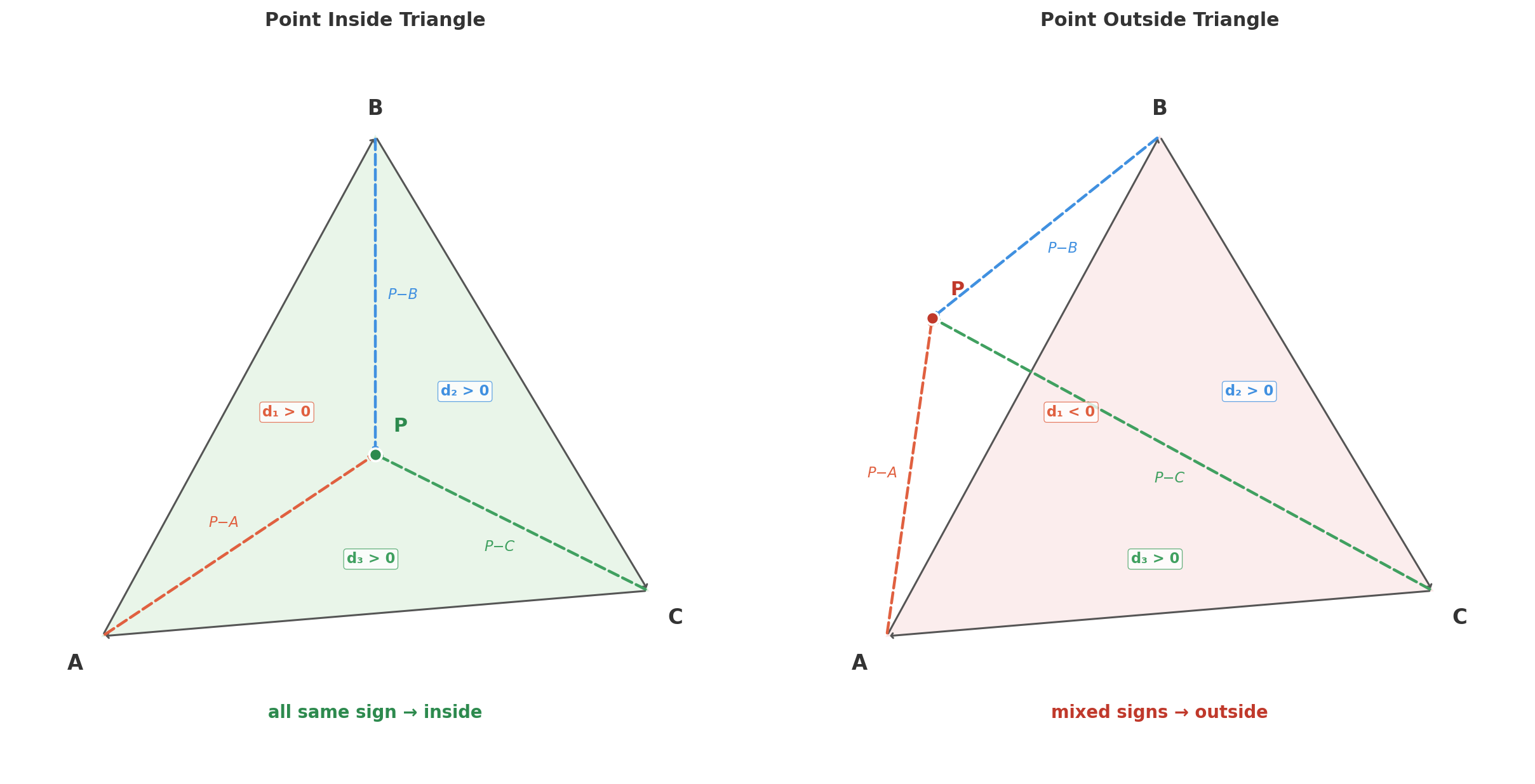
Left: P inside the triangle — all cross products share the same sign. Right: P outside — d₁ has opposite sign from d₂ and d₃. -
In the implementation, the
tri_signfunction computes this 2D cross product:
The final boolean expression is equivalent to checkingfunction tri_sign(x1, y1, x2, y2, x3, y3) { return (x1 - x3) * (y2 - y3) - (x2 - x3) * (y1 - y3); } function point_in_triangle(px, py, ax, ay, bx, by, cx, cy) { var d1 = tri_sign(px, py, ax, ay, bx, by); var d2 = tri_sign(px, py, bx, by, cx, cy); var d3 = tri_sign(px, py, cx, cy, ax, ay); return !((d1 < 0 || d2 < 0 || d3 < 0) && (d1 > 0 || d2 > 0 || d3 > 0)); }!(has_negative && has_positive), which is true only when all signs agree. - Building the Intent Triangle
-
In latentspace.js, when the mouse leaves a node,
the system constructs a triangle before deciding whether to dismiss the tooltip.
The three vertices are:
- Apex (A): the screen position of the currently hovered node
- Corner B: one far edge of the tooltip bounding box (with padding)
- Corner C: the opposite far edge of the tooltip bounding box (with padding)
-
The tooltip can appear either left or right of the node depending on available space,
so the triangle flips accordingly:
Here, vertices B and C share the same x-coordinate (the far edge of the tooltip), but differ in y (top and bottom edges), forming a triangle that fans out from the node toward the entire height of the tooltip.function build_intent_triangle() { // ... get node screen position (dot_x, dot_y) // ... get tooltip rect (tt_left, tt_top, tt_w, tt_h) var pad = 6; return { ax: dot_x, ay: dot_y, bx: tt_left < dot_x ? tt_left - pad : tt_left + tt_w + pad, by: tt_top - pad, cx: tt_left < dot_x ? tt_left - pad : tt_left + tt_w + pad, cy: tt_top + tt_h + pad }; } - Integration into the Hover Flow
-
The triangle is checked at two points in the event flow:
-
mouseleaveon a node: The system builds the intent triangle and starts a short timer (80ms). If the cursor reaches the tooltip before the timer fires, the tooltip's ownmouseentercancels the dismiss. -
mouseenteron a different node: Before activating the new node, the system checksis_moving_toward_tooltip(mx, my). If the cursor is inside the intent triangle, the new node's hover is suppressed, and the current tooltip remains.// inside mouseenter handler if (intent_triangle && active_hover_node && active_hover_node !== d) { var rect = container.getBoundingClientRect(); var mx = event.clientX - rect.left; var my = event.clientY - rect.top; if (is_moving_toward_tooltip(mx, my)) return; // suppress }
-
- The intent triangle is cleared whenever a new node is explicitly activated, the cursor enters the tooltip, or a drag/pan interaction begins. This ensures the triangle only persists during the narrow window of diagonal cursor travel.
- Ref
- PARKCHEOLHEE-lab/PARKCHEOLHEE-lab.github.io#30 - PR that introduced the triangle intent detection
- Breaking Down Amazon's Mega Dropdown - Ben Kamens' original analysis (2013)
- jQuery-menu-aim - jQuery plugin by Ben Kamens implementing the pattern
- Fitts's Law