Multiprocessing refers to the ability of a computer system to execute multiple processes or tasks concurrently.
It involves the use of multiple processors or processor cores to perform multiple tasks
simultaneously, thereby improving overall system performance and efficiency.
In a multiprocessing system, each process is an independent unit of execution with its own program counter, stack, and data section.
These
processes can run concurrently, enabling parallelism and the efficient utilization of system resources.
- Processes: A process is an instance of a running program. Each process has its own memory space, file descriptors, and system resources. Processes are created and managed by the operating system.
They can communicate with each other using inter-process communication mechanisms.
Multiprocessing can be understood easily through a very simple example, as follows:
    from multiprocessing import Pool, cpu_count
    import time

    def f(x):
        time.sleep(1)
        return x*x

    def parallel_execution(max_range):
        start = time.time()
        with Pool(processes=cpu_count()) as p:
            x_squared = p.map(f, range(max_range))

        parallel_time = time.time() - start
        print(f"Parallel execution time: {parallel_time}")

        return x_squared

    def sequential_execution(max_range):
        start = time.time()
        x_squared = []
        for x in range(max_range):
            x_squared.append(f(x))

        sequential_time = time.time() - start
        print(f"Sequential execution time: {sequential_time}")

        return x_squared


    if __name__ == '__main__':

        max_range = 10
        x_squared_parallel = parallel_execution(max_range)
        x_squared_sequential = sequential_execution(max_range)

        # Parallel execution time: 1.8122541904449463
        # Sequential execution time: 10.073817014694214
The
parallel_execution and
sequential_execution functions both use
f(x),
which returns the squared value of a given x after waiting 1 second (sleep).
In the sequential function, therefore, the result is obtained only after waiting
at least max_range * 1 seconds (on my computer, this took 10.073817014694214 seconds).
The parallel function, on the other hand, took 1.8122541904449463 seconds.
Because it executes as many tasks simultaneously as
cpu_count, waiting
max_range * 1 seconds is no longer necessary.
The performance of a real algorithm can now be improved by applying multiprocessing (this task corresponds to defining the f(x) shown above).
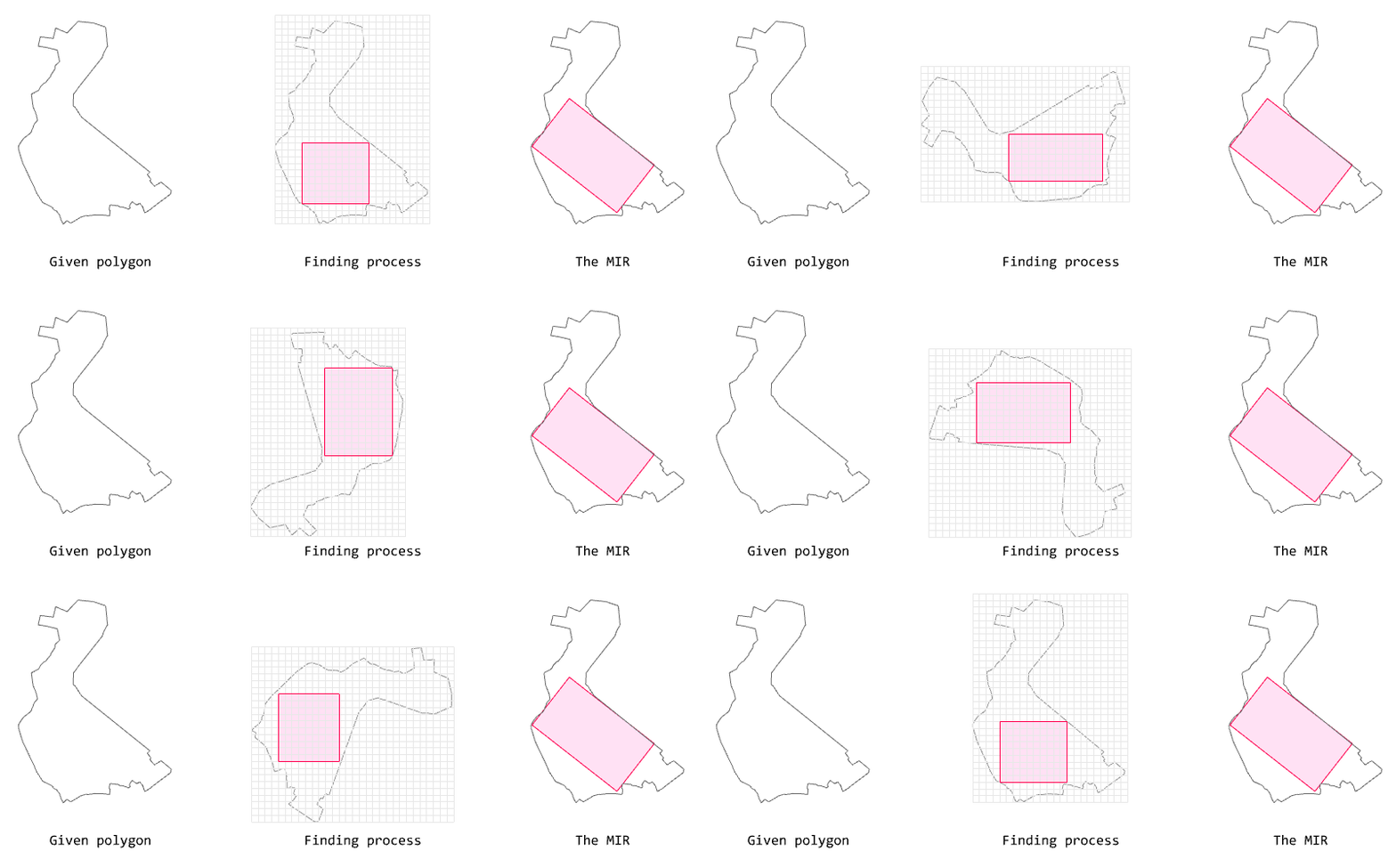
The algorithm below finds the
MIR (Maximal Inner Rectangle) for a given polygon.
 Algorithm for finding MIR
This algorithm approximates the maximal rectangle within a given polygon based on the rotation interval degree and the grid size.
Smaller values for the
rotation interval degree and the
grid size produce more accurate rectangles but run more slowly.
The algorithm is based on rotating a polygon at the input rotation intervals and creating a binary grid (AABB, axis-aligned).
That is, the same logic is executed at every rotation interval. Accordingly, the code for finding the MIR can be written with
parallelism in mind, as follows.
    def _generate_maximal_inner_rectangle(
        self, polygon, rotation_degree, grid_size, is_strict
    ):
        """Estimates the maximum inner rectangle of the given polygon by `rotation_degree` and `grid_size`

        Args:
            polygon (Rhino.Geometry.PolylineCurve): polygon to estimate
            rotation_degree (float): rotation step
            grid_size (float): size of the grid each cell
            is_strict (bool, optional): if true, only uses fully inner cells. Defaults to False.

        Returns:
            Rhino.Geometry.PolylineCurve: estimated maximal rectangle

        Reference:
            https://leetcode.com/problems/maximal-rectangle/solutions/3407011/ex-amazon-explains-a-solution-with-a-video-python-javascript-java-and-c/
            https://chat.openai.com/share/50607e72-da71-4938-8a4d-61d94b097ede
        """

        anchor = rg.AreaMassProperties.Compute(polygon).Centroid
        mir_args_list = []

        each_degree = 0
        while each_degree <= 359:
            each_args = []

            each_angle = math.radians(each_degree)

            rotation_transform = rg.Transform.Rotation(each_angle, anchor)
            rotated_polygon = copy.copy(polygon)
            rotated_polygon.Transform(rotation_transform)

            each_args = [
                rotated_polygon,
                anchor,
                each_angle,
                grid_size,
                is_strict,
            ]

            mir_args_list.append(each_args)

            each_degree += rotation_degree

        # Parallel execution
        if self.is_parallel:
            mirs = ghpythonlib.parallel.run(self._get_each_mir, mir_args_list, True)

        # Sequential execution
        else:
            mirs = [self._get_each_mir(each_args) for each_args in mir_args_list]

        mir = max(
            list(mirs), key=lambda m: rg.AreaMassProperties.Compute(m).Area
        )

        return mir
It should be noted that GhPython has no multiprocessing module, so parallelization is achieved through the
ghpythonlib.parallel module.
Because GhPython is IronPython implemented on the .NET Framework, the multiprocessing module used in C# could presumably be used instead.
On my computer, the following results were obtained. When run in parallel, it takes 1.9735183715820313 seconds, and when run sequentially, it takes 8.2854690551757813 seconds.
With parallel processing, the result can therefore be obtained roughly
4x faster. A larger number of inputs can be expected to yield an even greater performance gain.
 Compare execution time for Parallel vs. Sequential
The code for the above is available at
this link.