Office Layout Generation Agents
PlanNext
PlanNext is a cloud-based API service that uses Large Language Models to generate optimized office layouts from natural language input.
By
interpreting text-based requirements, it automatically generates layouts divided into essential work zones: Focus, Collaboration, Social, Functional, Service, and Private.
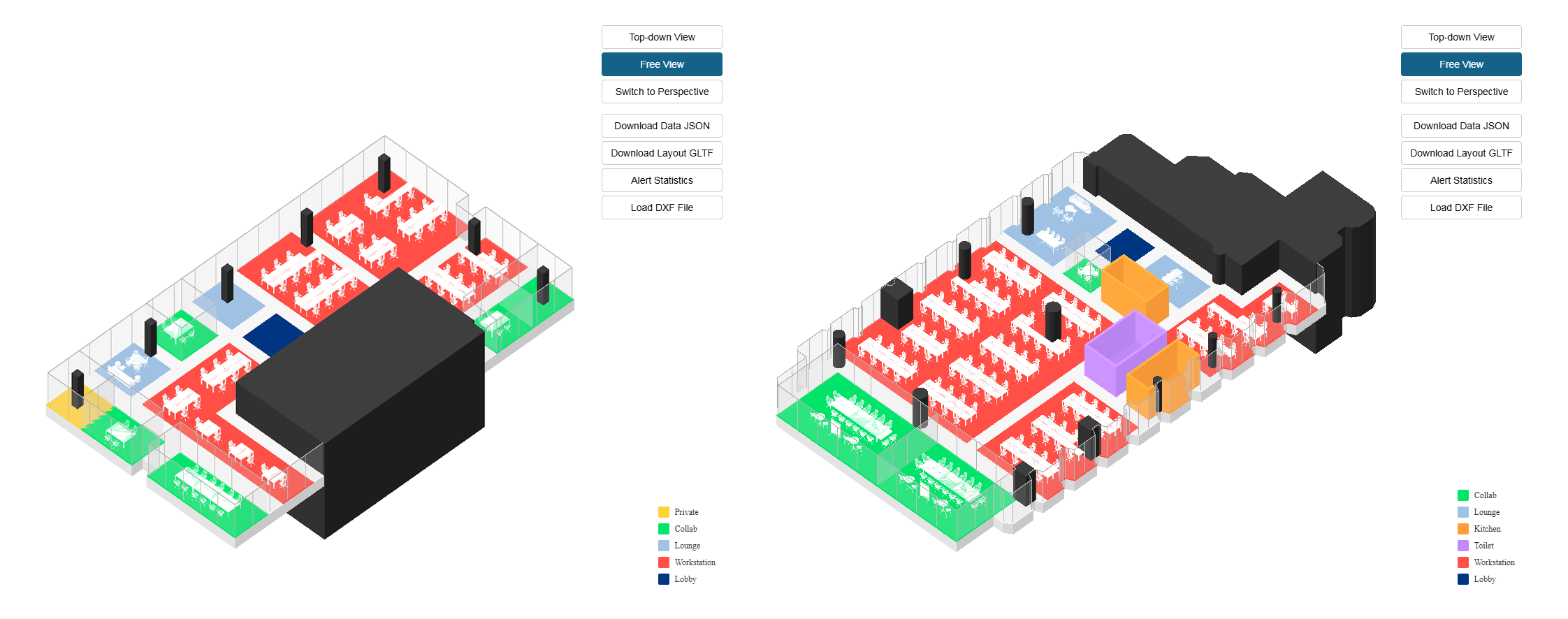 Visualized results from PlanNext API
This flow chart shows the complete pipeline of an LLM-based office layout generation system.
When a user provides layout requirements in natural language, the
OrchestrationAgent analyzes the request and selects the required specialized agents.
Agents for directions, workstations, area ratios, density, weights, adjacency, and other layout constraints each interpret the requirements from their perspective.
All agent results are converted into structured data and sent to the optimization engine.
The optimization engine initializes the environment based on these interpretations and iteratively improves layout solutions through optimization algorithms.
Each iteration evaluates the layout using evaluation functions, updates the best solution, and repeats this process until convergence conditions are met.
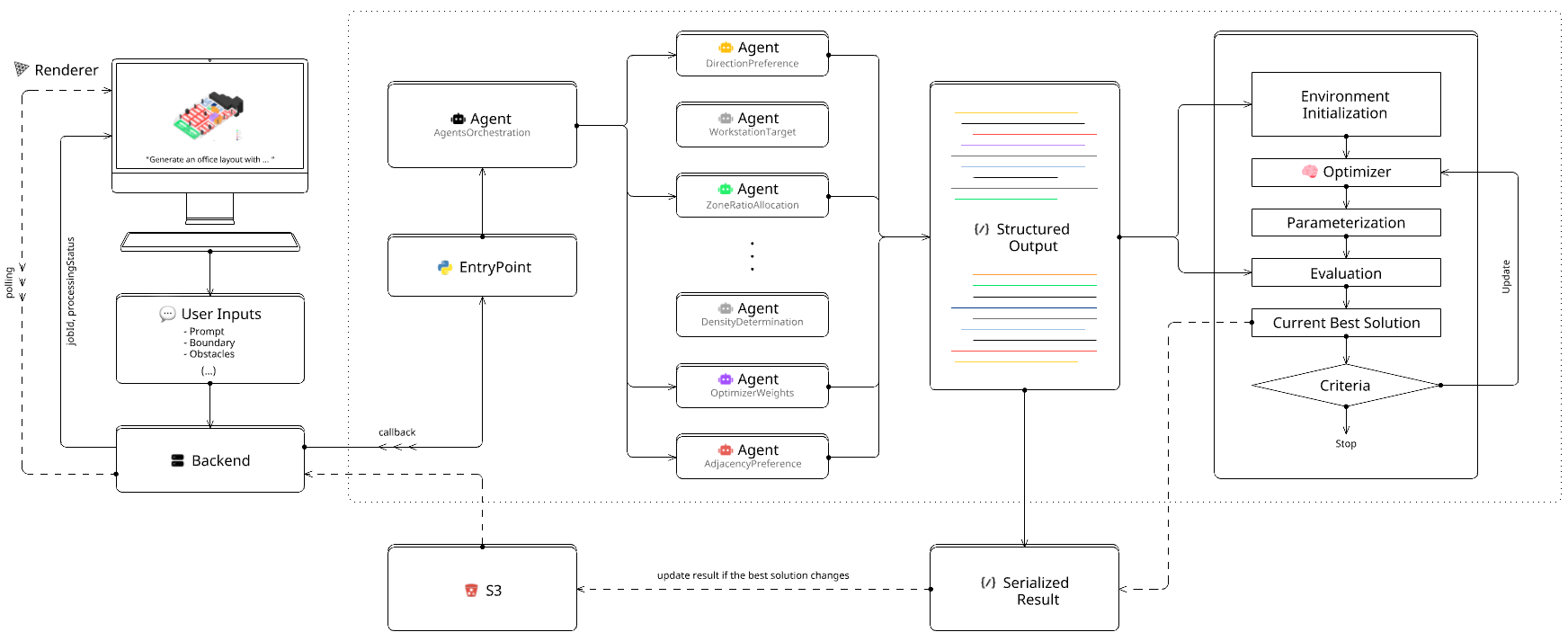 PlanNext Abstract Workflow
Base Agent Design
The
BaseAgent abstract class defines the interface and shared behavior for all agents.
It includes abstract methods for key functions that must be implemented by all derived agents.
Each agent must define the following attributes:
1)
system_prompt: contains the agent's specialized domain knowledge and explicit instructions for the LLM.
2)
output_format: specifies the structure and data types of the LLM's output.
3)
output_default: provides default values for the agent's output if the LLM call fails or returns an unexpected result.
4)
call_payload: defines the parameter template for OpenAI API calls. This includes model selection, temperature, max tokens, and other related settings, ensuring consistent and reproducible agent behavior.
    class BaseAgent(ABC, metaclass=BaseAgentMeta):
        _system_prompt = None
        _output_default = None
        _output_format = None
        _call_payload = None

        def __init__(self, client: Union[OpenAI, AsyncOpenAI]):
            self.client = client

        @abstractmethod
        def sync_call(self):
            raise NotImplementedError

        @abstractmethod
        def async_call(self):
            raise NotImplementedError

        (...)
BaseAgent abstract class
Below is a simplified example of a
WeightsAgent that inherits from
BaseAgent.
This agent is responsible for assigning weights to an objective function composed of multiple components,
so that the assigned weights can be used to compute a weighted sum.
The code below shows how to define the required attributes and output structure using
Pydantic BaseModel.
    class Weight(BaseModel):
        weight: float


    class Weights(BaseModel):
        weight_a: Weight
        weight_b: Weight
        weight_c: Weight


    class WeightsAgent(BaseAgent):
        _system_prompt = """You are an assignor who works on assigning weights to our objective function."""
        _output_format = Weights
        _output_default = Weights(
            weight_a=Weight(weight=1.0),
            weight_b=Weight(weight=1.0),
            weight_c=Weight(weight=1.0),
        )
        _call_payload = {
            "model": CONFIG.MODEL_NAME,
            "input": None,
            "text_format": _output_format,
        }

        def __init__(self, client: Union[OpenAI, AsyncOpenAI]):
            super().__init__(client)

        (...)

        def sync_call(self, prompt_user: str, normalize: bool = True) -> Weights:
            try:
                response = self.client.responses.parse(**self.create_payload(prompt_user))

                weights = response.output_parsed
                assert all(isinstance(v.weight, float) for _, v in weights)

                if normalize:
                    self._normalize(weights)

                return weights

            except:
                traceback.print_exc()
                return self.output_default

        async def async_call(self, prompt_user: str, normalize: bool = True) -> Weights:
            try:
                response = await self.client.responses.parse(**self.create_payload(prompt_user))

                weights = response.output_parsed
                assert all(isinstance(v.weight, float) for _, v in weights)

                if normalize:
                    self._normalize(weights)

                return weights

            except:
                traceback.print_exc()
                return self.output_default
WeightsAgent derived from BaseAgent
Following the abstract methods of the base agent,
sync_call and
async_call can be defined as follows.
Both functions perform the same task and return the same result. The only difference is whether async/await syntax is used.
If there are only a few agents, calling the API for each agent sequentially may not cause significant delays.
However, in environments with many agents that must interpret user prompts and return results, the
processing time increases linearly with the number of agents.
Therefore, multiple API calls should be wrapped with async/await so that they can be requested concurrently.
This will be discussed further in the Agents Orchestration section.
Geometric Context Engineering
Office layout agents must interpret user prompts together with the given geometric conditions.
Examples of these conditions include the space boundary, the location of columns, and other geometric constraints.
In this context, geometric context engineering refers to structuring spatial information in a way that LLMs can understand and use for decision-making.
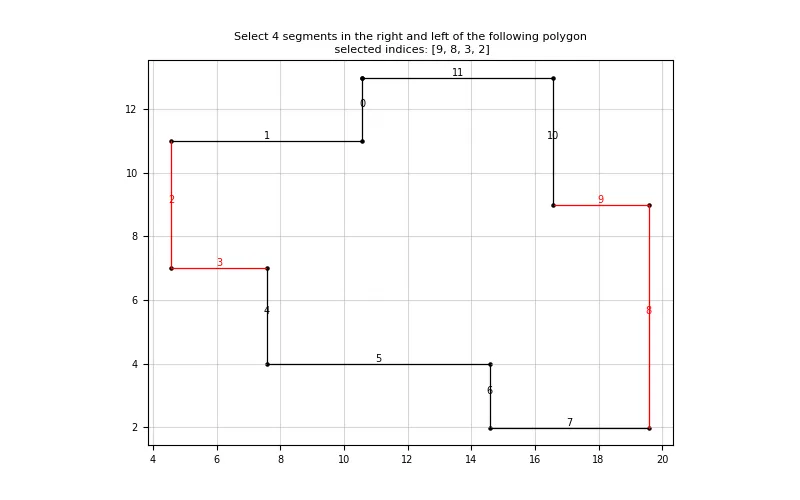 An example of direction-based segment selection with
"Select 4 segments in the right and left of the following polygon"
In direction-based polygon segment selection, it is important to consider how the agent can understand and process directional information
such as 'right', 'left', 'east', and 'west'.
For example, when a user requests,
"Place all meeting rooms on the right side",
the agent can convert the natural language direction 'right' into a direction vector (e.g., [1, 0]) or select a predefined vector, and then
compare this with the direction of each segment to select those with the highest similarity.
In this way, abstract spatial instructions are connected to concrete geometric operations.
    class SegmentSelectionAgentConfiguration:
        DIRECTION_VECTORS = {
            "right": (1, 0),
            "left": (-1, 0),
            "top": (0, 1),
            "bottom": (0, -1),
            "right_top": (1, 1),
            "left_top": (-1, 1),
            "left_bottom": (-1, -1),
            "right_bottom": (1, -1),

            (...)
        }

        (...)


    class SegmentSelectionAgent(BaseAgent):

        (...)

        def _compute_segments_vectors(self, segments: List[LineString]) -> List[List[float]]:
            vectors = []
            for segment in segments:
                divided_points = self._divide_segment(
                    segment,
                    SegmentSelectionAgentConfiguration.SEGMENT_DIVISION_COUNT
                )

                centroid_to_segment = divided_points - self.polygon_centroid_np
                centroid_to_segment /= np.linalg.norm(centroid_to_segment, axis=1, keepdims=True)

                assert np.allclose(np.linalg.norm(centroid_to_segment, axis=1), 1.0)

                vectors.append(centroid_to_segment.tolist())

            return vectors

        def _compute_segment_similarities(
            self,
            target_vector: Tuple[float, float],
            similarity_threshold: float,
        ) -> List[Tuple[int, float]]:
            segments_vectors = self._compute_segments_vectors(self.polygon_segments)

            similarities = []
            for idx, vectors in enumerate(segments_vectors):
                cosine_similarities = np.dot(vectors, target_vector)
                # cos(θ) = x · y, where ||x|| and ||y|| are both 1.0.

                mask = cosine_similarities >= similarity_threshold
                if mask.sum().item() >= len(vectors) // SegmentSelectionAgentConfiguration.MASK_MATCHING_DIVIDER:
                    similarities.append((idx, cosine_similarities[mask].sum()))

            return similarities

        (...)
SegmentSelectionAgent derived from BaseAgent
The
SegmentSelectionAgent demonstrates this approach by dividing each polygon segment into multiple points and computing direction vectors from the polygon centroid to these points.
By normalizing these vectors to unit length, the agent can use a dot product to calculate cosine similarity.
This allows the agent to find the vector most similar to a target vector selected from the user's prompt and select the segment in that direction.
The implementation using function calling can be found in this
repository.
Numerical Reasoning
For the prompt
"Generate an office layout with a kitchen, a pantry, two storages and lounges, three meeting rooms",
the agent is expected to output 1 kitchen, 1 pantry, 2 storages, 2 lounges, and 3 meeting rooms,
which can be represented as the structured output on the left below.
However, with the prompt above and a low-cost model, unexpected results may occur.
Since LLMs are not deterministic systems,
the output can vary each time, even with the same prompt.
The result on the right below is an example encountered during development.
    "program_counts": {
        "kitchen": {"count": 1},
        "pantry": {"count": 1},
        "storage": {"count": 2},
        "meeting_room": {"count": 3}
    }
    "program_counts": {
        "kitchen": {"count": 1},
        "pantry": {"count": -1},
        "storage": {"count": -1},
        "meeting_room": {"count": 3}
    }
Expected structured output vs. Actual structured output
In such situations,
asking the model to provide reasoning for its output can help obtain more accurate results.
This approach can be applied even to models that do not have a built-in reasoning parameter.
It only requires adding a reasoning field to the output format.
For example, by adding a
reasoning field as shown below,
the model returns not only the count for each space, but also the rationale behind it.
This increases the reliability of the results and is also helpful for future debugging or for improving the system prompts.
The
reasoning field can be a simple explanation such as 'explicitly mentioned in the prompt'
or, in cases that require more complex inference, the model can describe its reasoning process in natural language.
Below are examples of the Pydantic BaseModel before and after adding the reasoning field, as well as a sample output that includes reasoning.
    class ProgramCount(BaseModel):
        count: int


    class ProgramCounts(BaseModel):
        kitchen: ProgramCount
        pantry: ProgramCount
        storage: ProgramCount
        meeting_room: ProgramCount


        (...)
    class ProgramCount(BaseModel):
        count: int
        reasoning: str


    class ProgramCounts(BaseModel):
        kitchen: ProgramCount
        pantry: ProgramCount
        storage: ProgramCount
        meeting_room: ProgramCount

        (...)
    "program_counts": {
        "kitchen": {"count": 1, "reasoning": "The prompt explicitly requests a kitchen."},
        "pantry": {"count": 1, "reasoning": "The prompt explicitly requests a pantry."},
        "storage": {"count": 1, "reasoning": "The prompt explicitly requests two storage spaces."},
        "meeting_room": {"count": 3, "reasoning": "The prompt explicitly requests three meeting rooms."}
    }
w/o and w/ reasoning
w/o reasoning (left top) · w/ reasoning (right top) · output w/ reasoning (bottom)
Orchestrating Multiple Agents
When working with multiple agents that need to interpret user prompts at the same time,
orchestration becomes important for performance.
As mentioned in the Base Agent Design section, processing time increases linearly with the number of agents when they are called sequentially.
For a system with many agents, this can result in significant delays.

 Sequential Pattern
& Concurrent Pattern
Sequential Pattern
& Concurrent Pattern
Since each agent interprets the same user prompt from its specialized role (directions, weights, program counts, and other parameters),
these operations are independent and can be executed concurrently using
asyncio.gather.
The orchestration pattern shown above demonstrates how to coordinate multiple specialized agents efficiently.
This approach scales well as new agents are added to the system, because
the total execution time is limited by the slowest agent rather than increasing linearly.
Below is a simplified example of the
OrchestrationAgent, which is
responsible for determining which specialized agents should be handed off based on the user's prompt.
The orchestration agent analyzes the natural language input and decides which agents are relevant for the specific request,
helping to optimize both execution time and API costs by avoiding unnecessary agent calls.
    class Orchestration(BaseModel):
        handoff_agent_a: bool
        handoff_agent_b: bool
        handoff_agent_c: bool


    class OrchestrationAgent(BaseAgent):
        _system_prompt = f"""
            You are an orchestration agent for an office layout system.

            {inspect.getsource(AgentA)}
            {inspect.getsource(AgentB)}
            {inspect.getsource(AgentC)}
        """
        _output_format = Orchestration
        _output_default = Orchestration(
            handoff_agent_a=True,
            handoff_agent_b=True,
            handoff_agent_c=True,
        )
        _call_payload = {
            "model": CONFIG.MODEL_NAME,
            "input": None,
            "text_format": _output_format,
        }

        ( ... )

        async def async_call(self, prompt_user: str) -> Orchestration:
            try:
                response = await self.client.responses.parse(**self.create_payload(prompt_user))
                return response.output_parsed

            else:
                traceback.print_exc()
                return self.output_default
OrchestrationAgent class
The
concurrent_call function below demonstrates a practical implementation of agent orchestration.
It starts by initializing an
Aggregation object with default values from each agent,
so the system has fallback data even if some agents fail to execute properly.
Only the selected agents are then added to the task list.
    class Aggregation(BaseModel):
        agent_a_output = OutputA
        agent_b_output = OutputB
        agent_c_output = OutputC


    async def concurrent_call(prompt_user: str, orchestration: Orchestration) -> Aggregation:
        aggregation = Aggregation(
            agent_a_output=AgentA.output_default
            agent_b_output=AgentB.output_default
            agent_c_output=AgentC.output_default
        )

        try:
            tasks = []
            if orchestration.handoff_agent_a:
                tasks.append(("agent_a_output", AgentA.async_call(prompt_user)))
            if orchestration.handoff_agent_b:
                tasks.append(("agent_b_output", AgentB.async_call(prompt_user)))
            if orchestration.handoff_agent_c:
                tasks.append(("agent_c_output", AgentC.async_call(prompt_user)))

            coroutines = [coroutine for _, coroutine in tasks]
            results = await asyncio.gather(*coroutines)

            results_dict = {name: result for (name, _), result in zip(tasks, results)}

            if orchestration.handoff_agent_a:
                aggregation.__dict__.update(results_dict["agent_a_output"])
            if orchestration.handoff_agent_b:
                aggregation.__dict__.update(results_dict["agent_b_output"])
            if orchestration.handoff_agent_c:
                aggregation.__dict__.update(results_dict["agent_c_output"])

        except:
            traceback.print_exc()

        return aggregation
An example of concurrent call
By using
asyncio.gather, the total execution time becomes approximately equal to the slowest agent's response time
instead of the sum of all agents' response times. For example, if 6 agents each take 2-3 seconds to respond,
sequential execution would require 12-18 seconds, while concurrent execution completes in about 2-3 seconds.
    *******************Agent.sync_call Time taken: 1.0785422325134277 seconds
    ****************Agent.sync_call Time taken: 1.7512624263763428 seconds
    ********************Agent.sync_call Time taken: 2.7220466136932373 seconds
    ********************Agent.sync_call Time taken: 1.4213175773620605 seconds
    ************Agent.sync_call Time taken: 1.2441699504852295 seconds
    ******Agent.sync_call Time taken: 1.68034029006958 seconds

    (...)

    API Call Duration: 18.15 seconds
API Call Duration: 3.15 seconds
Sequential Call vs. Concurrent Call in Practice
Converting User Requests into Optimization Problems
This chapter describes the process of converting user requests into optimization problems based on the agent interpretation results.
Agents are not good at predicting continuous values, and their performance decreases when they directly infer spatial values such as coordinates.
Therefore, an approach that combines discrete reasoning with optimization is needed. An optimization environment is constructed to find layout arrangements that satisfy these relationships.
This project uses Evolution Strategy-based random search optimization algorithms, such as genetic algorithms.
This ES-based algorithm is suitable for geometry-based optimization problems because it does not require the environment to be differentiable.
For example, if a user requests "I want the meeting room and lounge to be close to each other",
the agent interprets this as a structured pairwise relationship: "meeting room - lounge adjacency."
The system then selects an appropriate objective function and includes it in the final optimization objective.
The user request can be expressed as maximizing the proximity between the meeting room and lounge polygons,
where \(d(\cdot, \cdot)\) represents the L2 distance between two points. Here, the closest points of the two polygons are used.
\[
\,\\
\max \; -d(\text{polygon}_m, \, \text{polygon}_l)
\,\\
\]
Similarly, if a user requests "Create an office with \(n\) desks and \(m\) meeting rooms",
the agent interprets this as count requirements for different space types.
This becomes a constraint satisfaction problem where the optimization must maximize count accuracy.
The optimization for the counting objective can be expressed as:
\[
\,\\
\max \; -\sum_i \left|\, \text{count}_i^{\text{actual}} - \text{count}_i^{\text{target}} \right|
\,\\
\]
The system combines multiple objective functions using weighted sums, where the weights are determined by the WeightsAgent based on the user's priorities.
Each objective function represents a different design requirement, such as adjacency, area ratio, density, or program count, and the weights control the importance of each objective in the optimization process.
Here, \(w_j\) is the weight assigned by the agent, \(f_j\) is the individual objective function, and \(\mathbf{x}\) represents the layout parameters being optimized.
\[
\,\\
\max \; \sum_{j=1}^{k} w_j \cdot f_j(\mathbf{x})
\,\\
\]
Generation Results
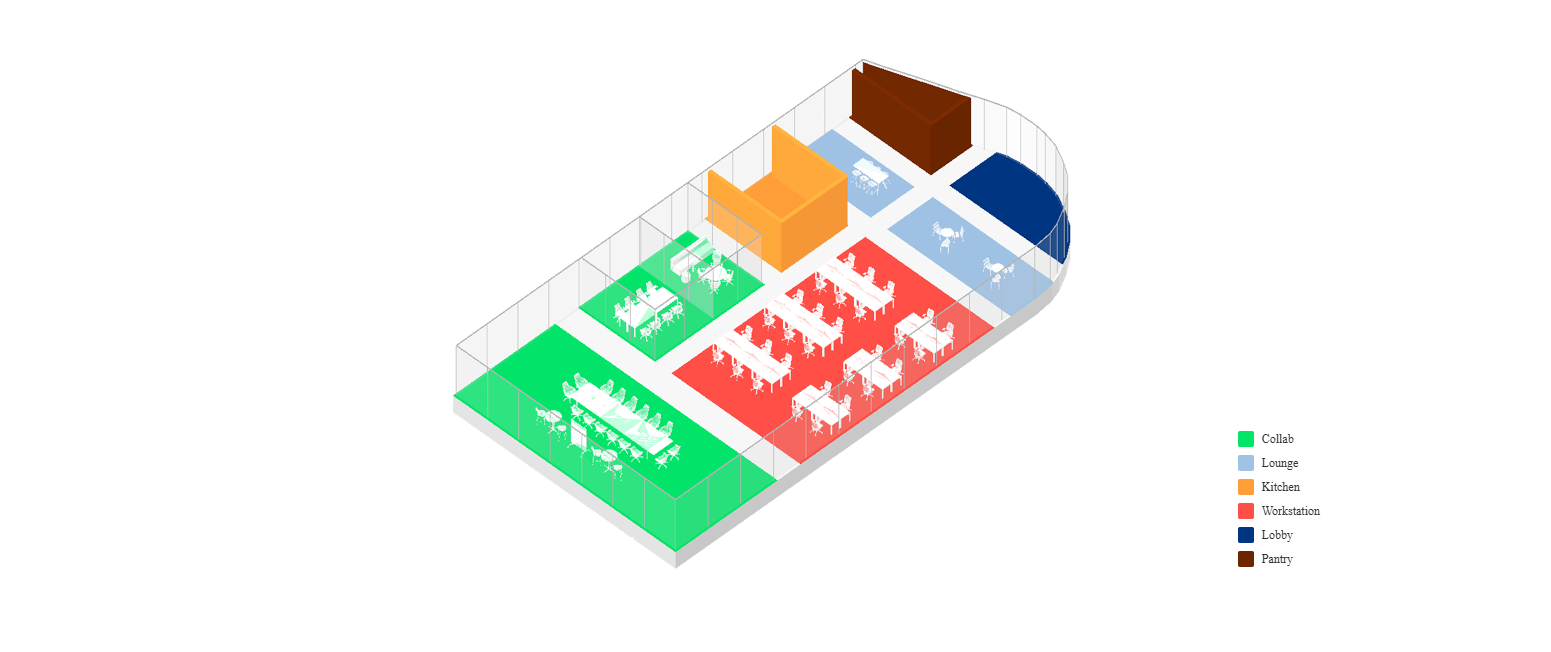 prompt_user:
"Office layout that specifically reflects the following: 30 workstations, three meeting rooms on the west side, two lounges, 1 kitchen, 1 pantry"
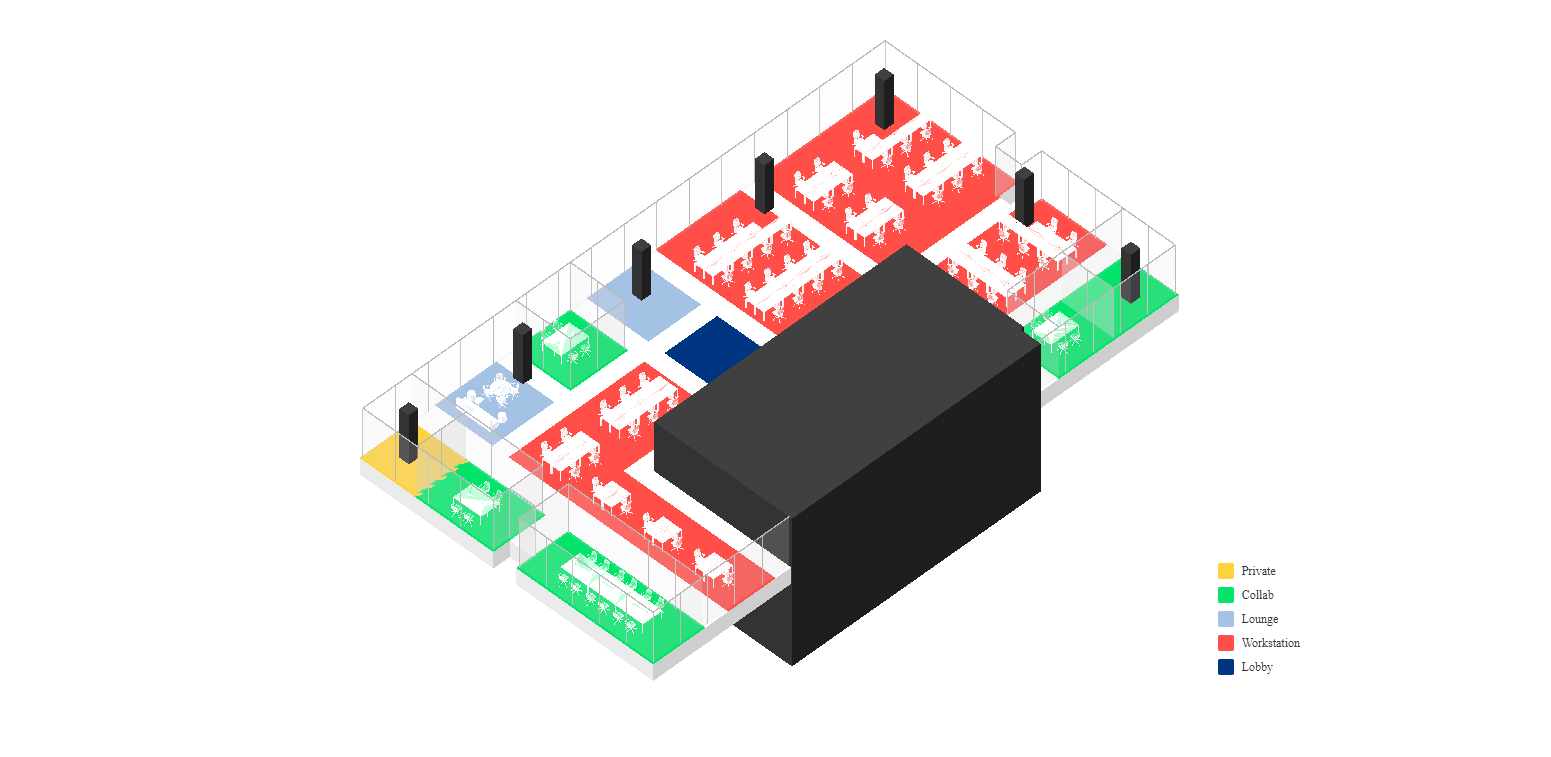
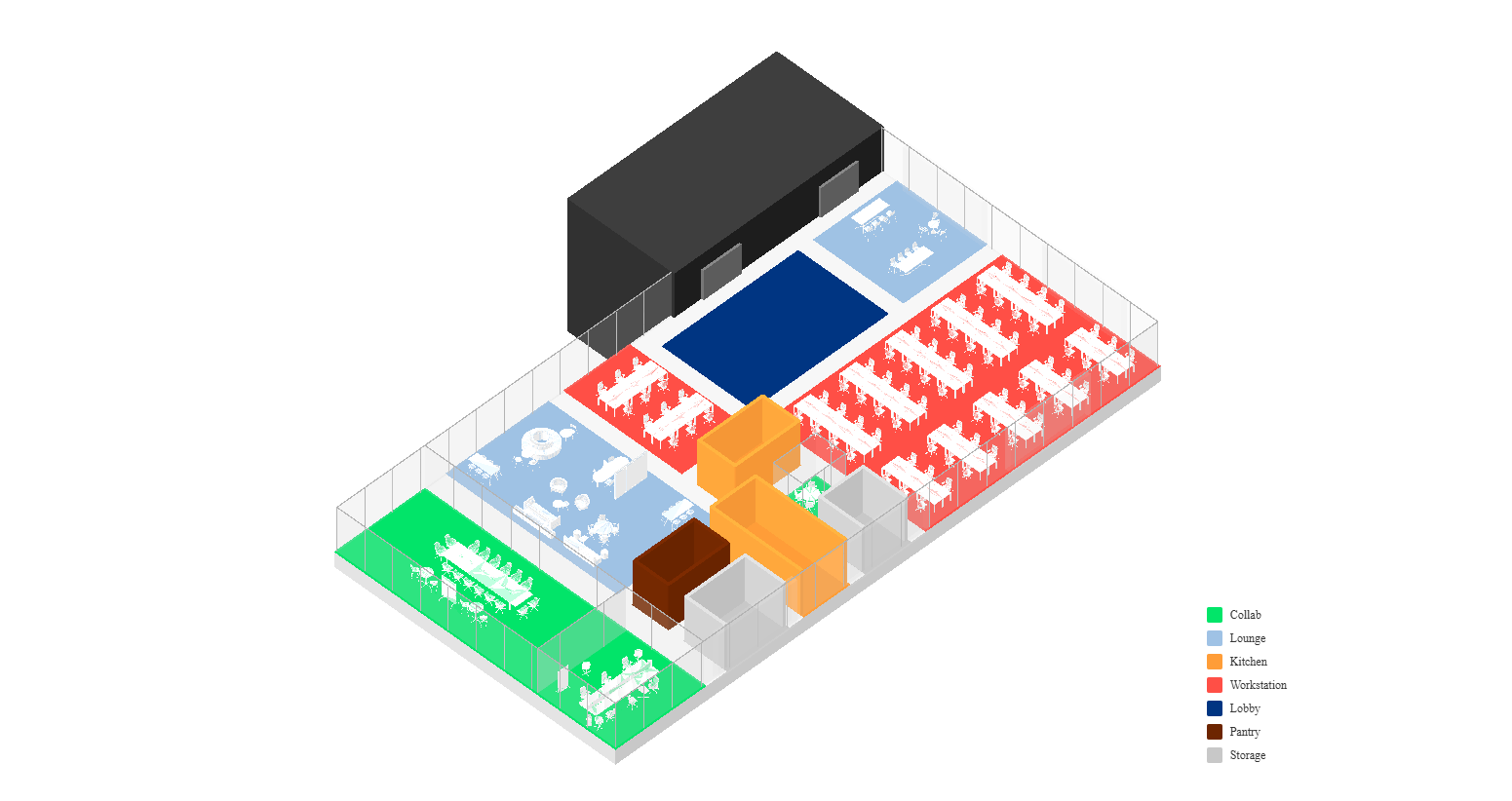 prompt_user:
"Generate an office layout with a lobby near to core, two kitchens and storages, three meeting rooms"
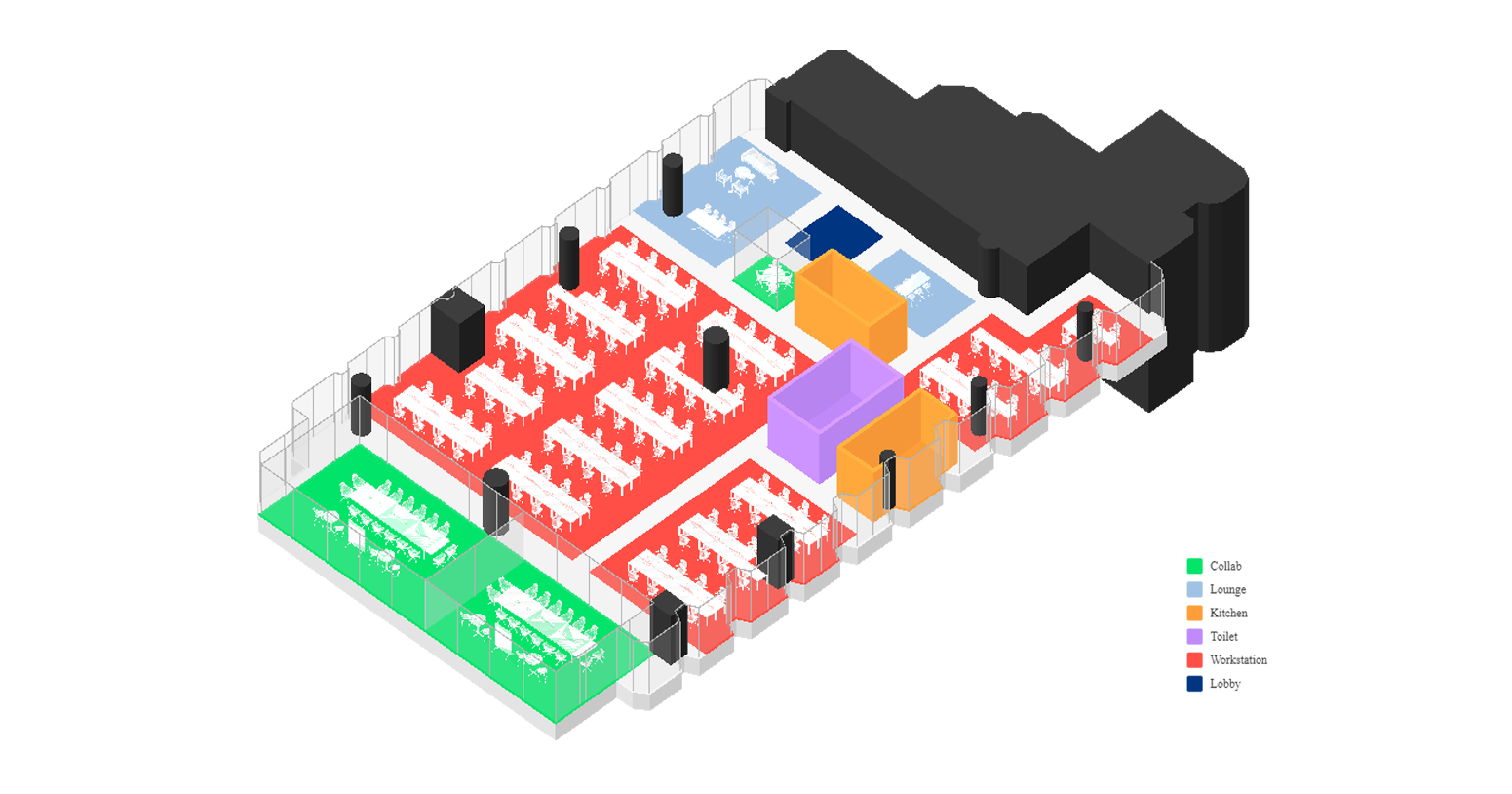
 prompt_user:
"I want an office for me and my team of 60 people"
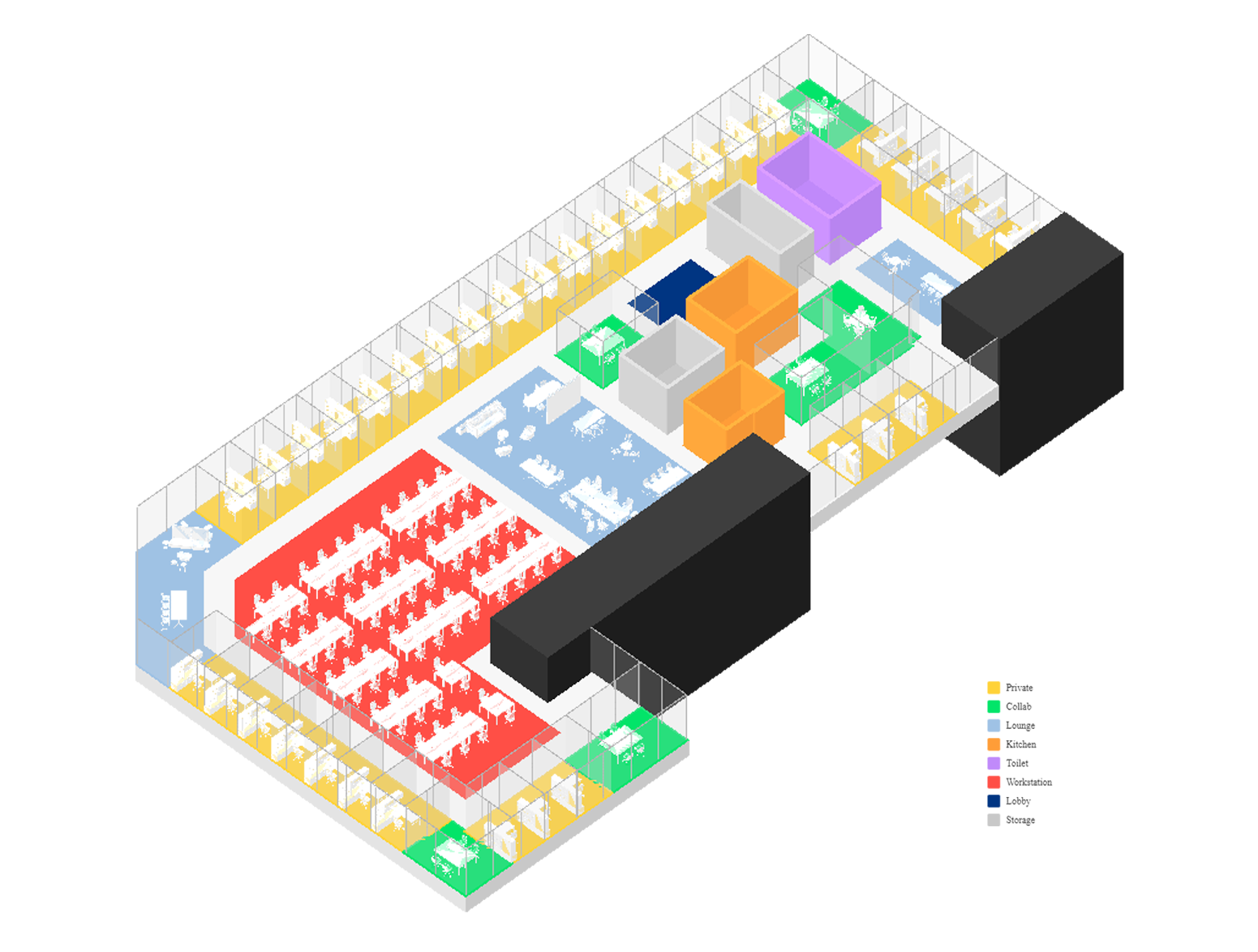
 prompt_user:
"Generate an office layout with: two lounges, two kitchens, a toilet, three meeting rooms"
 prompt_user:
"Design a traditional law office emphasizing privacy, enclosed offices"
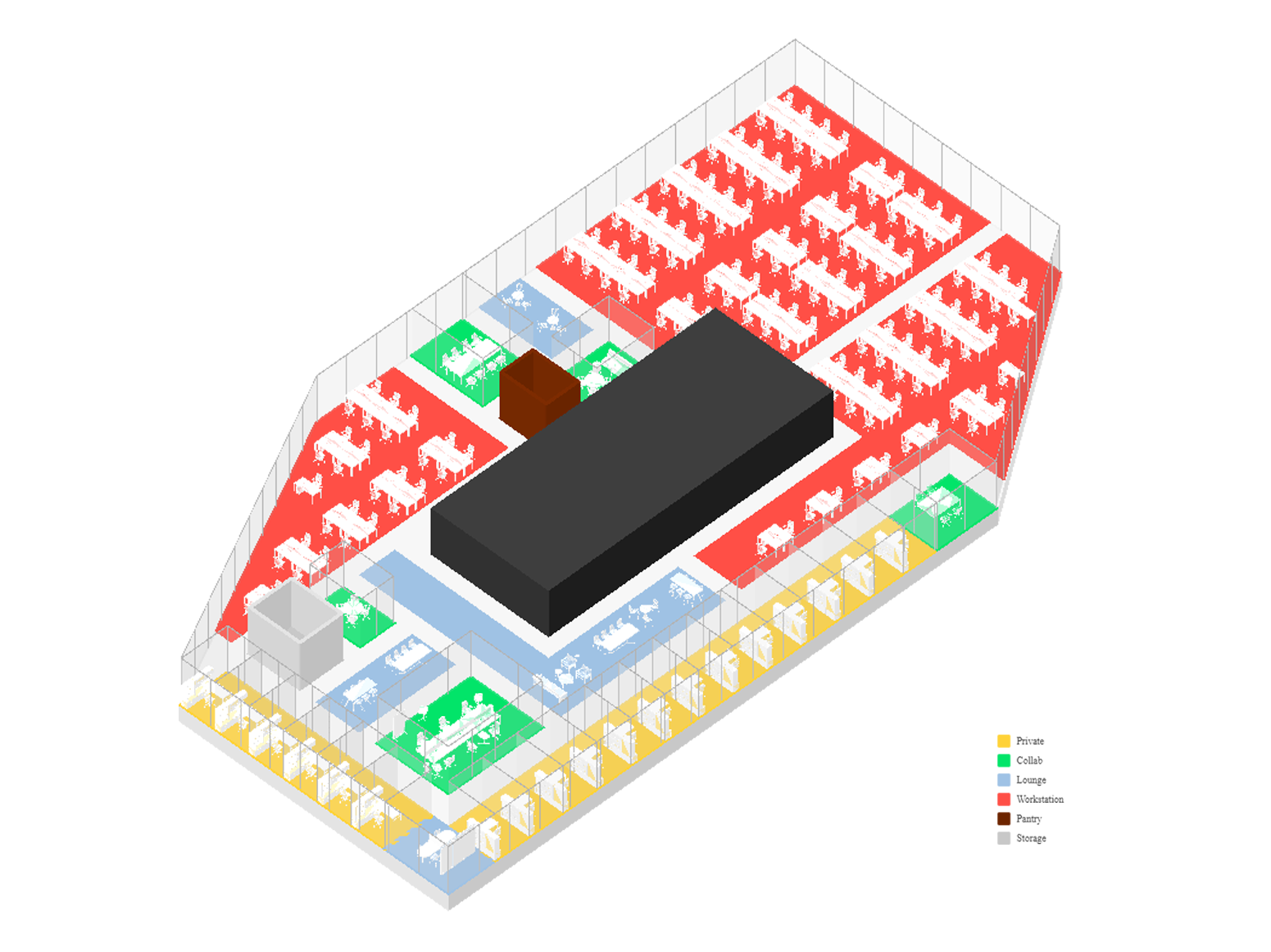 prompt_user:
"Private rooms on the left bottom sides. Five meeting rooms. Some functional and social zones"
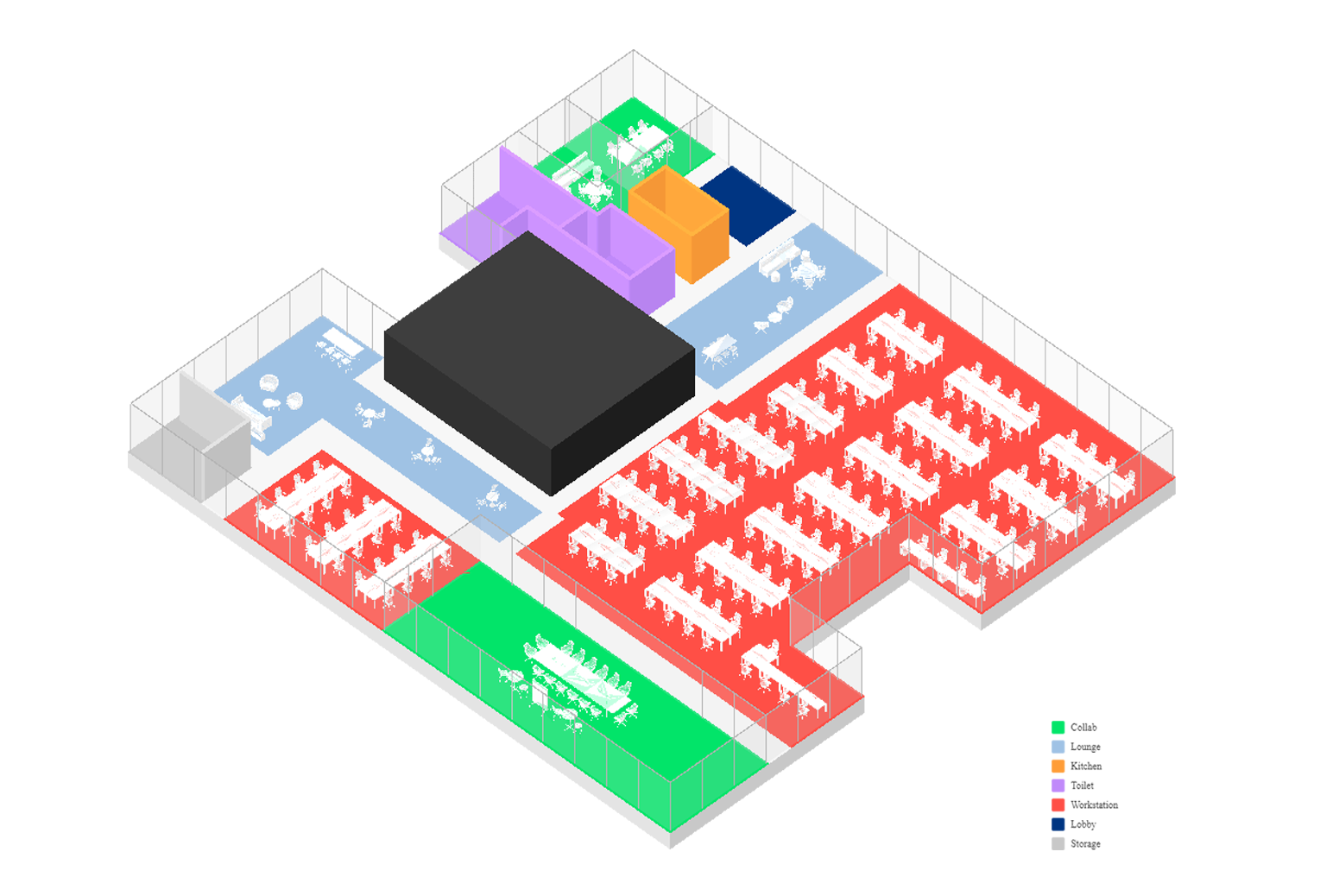 prompt_user:
"Design a layout with 50% desk zones, and 20% collaboration zones, 10% functional zones, 20% social zones"
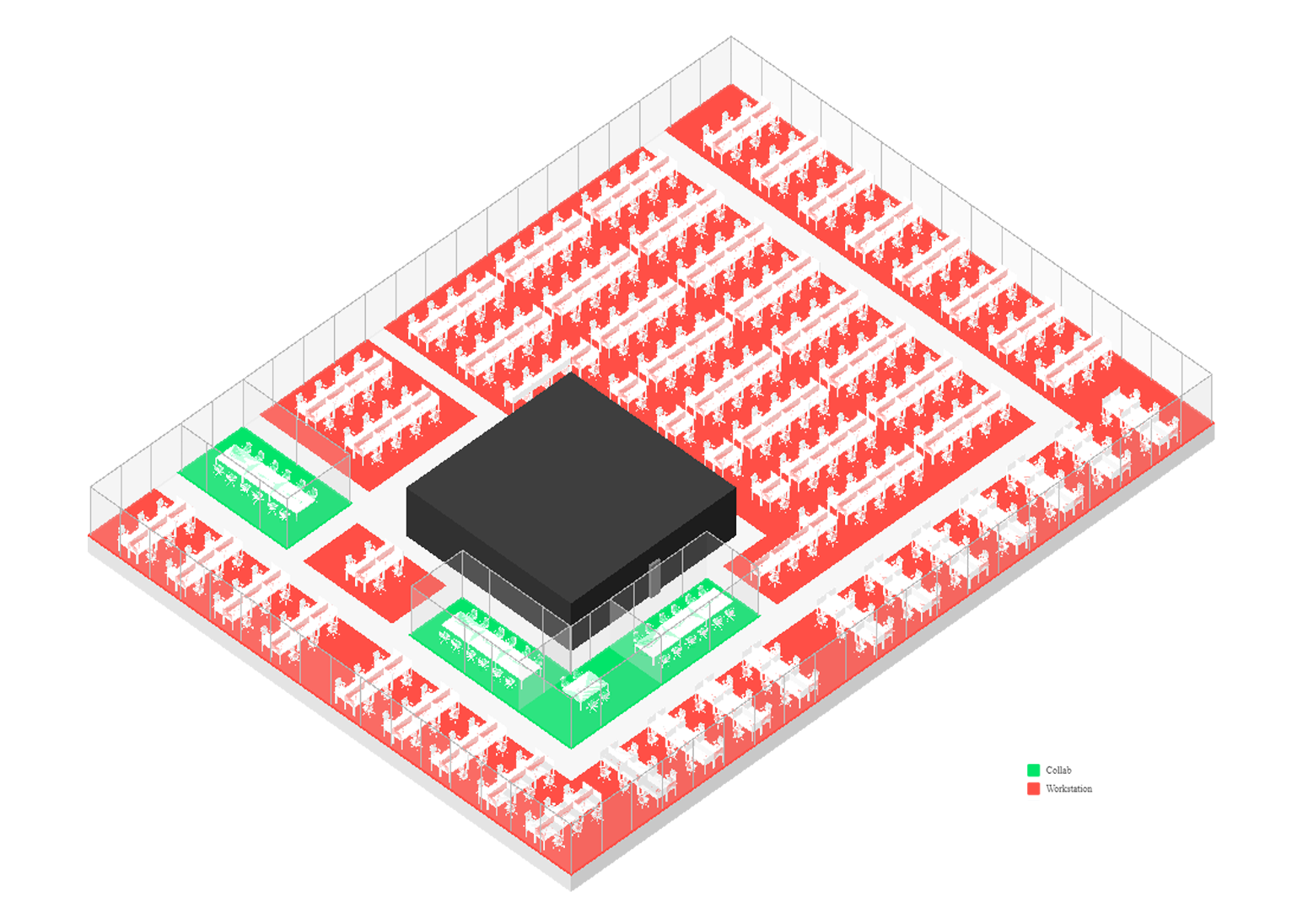 prompt_user:
"Create a hyper-dense layout for a call center"
Limitation
While the agent-based office layout generation system shows promising capabilities, several fundamental limitations still restrict its broader application.
The system's layout flexibility is limited unless agents can automatically define and implement their own objective functions for optimization targets.
Currently, many types of objective functions are predefined by developers.
This means the system can only optimize spatial relationships and constraints that have already been programmed.
However, defining objective functions still provides important value in maintaining the baseline quality of generated layouts.
By defining evaluation metrics, developers can ensure that basic spatial design principles are maintained.
This includes accessibility requirements, functional adjacencies, and geometric constraints such as aspect ratio and size, which are essential for practical office environments.
References & Resources