K-Means clustering 🕃
The
K-Means clustering algorithm partitions a given set of data
into
K clusters.
It operates by minimizing the distance differences
within each cluster.
The algorithm is a form of Unsupervised-Learning, and it
serves to label unlabeled input data.
Among clustering methods, the K-Means algorithm belongs to the partitioning method.
A partitioning method divides a given set of data into multiple partitions.
For example, assume that n data objects are provided as input. The partitioning method then divides the given data into
K groups, where K is less than
N, and each group forms a cluster.
In other words, a body of data is divided into one or more data objects.
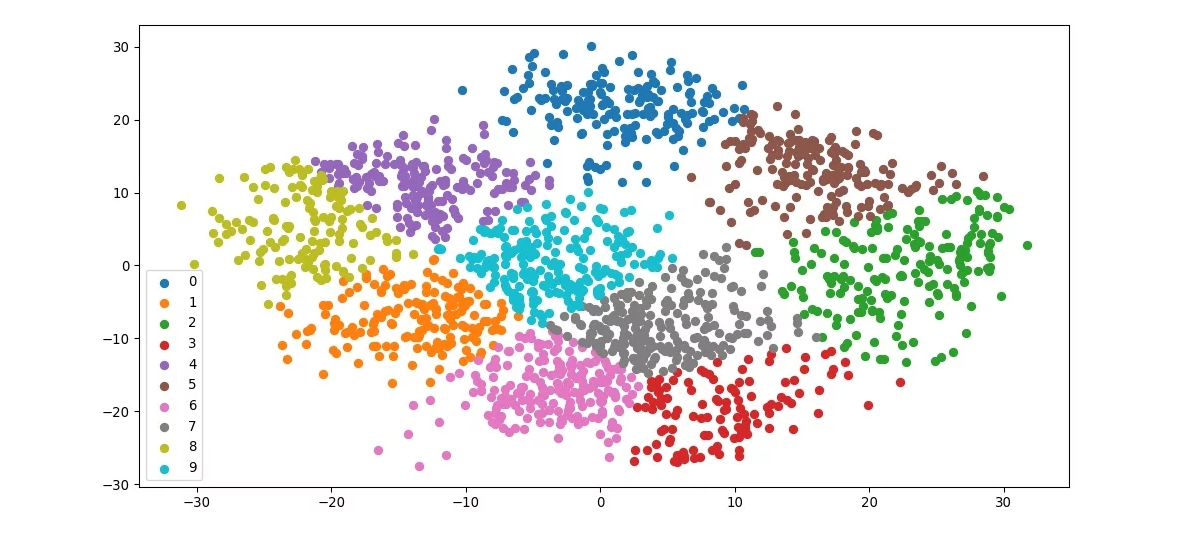 K-means clustering, divided into 10
Implementation
The operation flow of K-Means clustering consists of the following 5 steps:
- Select a value of K (the number of clusters) and enter the data.
- Set the initial cluster centroids at random.
- Assign each data point to the cluster whose centroid is nearest.
- Recalculate the cluster centroids and repeat step 4.
- Terminate when the centroid locations are no longer updated.
The K-Means algorithm is implemented based on the steps above. First, the
KMeans object is defined.
As input, it receives the
number of clusters(K) to divide, the
point cloud,
and
iteration_count, which is the number of centroid update iterations.
    class KMeans(PointHelper):
        def __init__(self, points=None, k=3, iteration_count=20, random_seed=0):
            """KMeansCluster simple implementation using Rhino Geometry

            Args:
                points (Rhino.Geometry.Point3d, optional): Points to classify. Defaults to None. if points is None, make random points
                k (int, optional): Number to classify. Defaults to 3.
                iteration_count (int, optional): Clusters candidates creation count. Defaults to 20.
                random_seed (int, optional): Random seed number to fix. Defaults to 0.
            """

            PointHelper.__init__(self)

            self.points = points
            self.k = k
            self.iteration_count = iteration_count
            self.threshold = 0.1

            import random  # pylint: disable=import-outside-toplevel

            self.random = random
            self.random.seed(random_seed)
Next, the centroids of the clusters are initialized, K in number, by
selecting K points from the given point cloud at random.
Once the initial centroids are set, the
distance between each centroid and the given point cloud is computed,
and each data point is assigned to the cluster with the closest distance.
All the cluster centroids are then updated. This requires
computing the centroids of the initial clusters(point cloud clusters)
.
Finally, the distance between the updated centroid and the previous centroid is computed.
If this distance no longer changes, the process terminates. Otherwise, the steps described above are repeated.
        def kmeans(self, points, k, threshold):
            """Clusters by each iteration

            Args:
                points (Rhino.Geometry.Point3d): Initialized given points
                k (int): Initialized given k
                threshold (float): Initialized threshold

            Returns:
                Tuple[List[List[Rhino.Geometry.Point3d]], List[List[int]]]: Clusters by each iteration, Indices by each iteration
            """

            centroids = self.random.sample(points, k)

            while True:
                clusters = [[] for _ in centroids]
                indices = [[] for _ in centroids]

                for pi, point in enumerate(points):
                    point_to_centroid_distance = [
                        point.DistanceTo(centroid) for centroid in centroids
                    ]
                    nearest_centroid_index = point_to_centroid_distance.index(
                        min(point_to_centroid_distance)
                    )

                    clusters[nearest_centroid_index].append(point)
                    indices[nearest_centroid_index].append(pi)

                shift_distance = 0.0
                for ci, current_centroid in enumerate(centroids):
                    if len(clusters[ci]) == 0:
                        continue

                    updated_centroid = self.get_centroid(clusters[ci])
                    shift_distance = max(
                        updated_centroid.DistanceTo(current_centroid),
                        shift_distance,
                    )

                    centroids[ci] = updated_centroid

                if shift_distance < threshold:
                    break

            return clusters, indices
With the code above, the point clusters can be obtained by setting K.
The detailed code for K-Means is available at this
link.
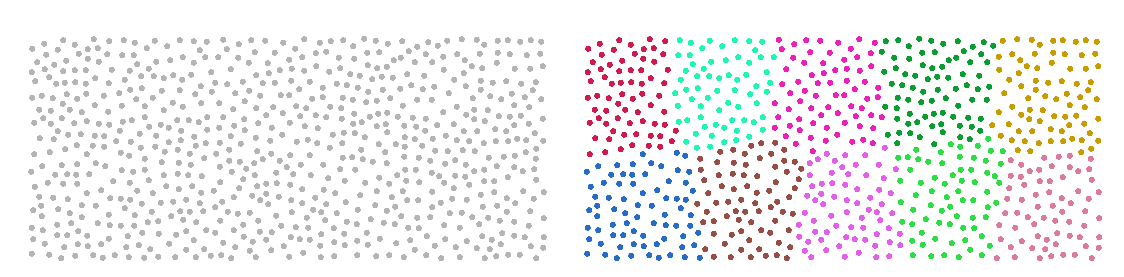 Implemented K-means clustering, divided into 10
From the left, Given Points · Result clusters
K-Rooms clusters
As described above, the K-Means algorithm clusters the given points into K groups.
Applying it makes it possible to divide a given architectural boundary into K parts.
This means that K rooms can be obtained.
Before writing the code, the following order is established.
- As input, the algorithm receives the building exterior wall line (a closed line) and the number of rooms to divide into.
- An oriented bounding box is created, and a grid is generated from it.
- The grid center points are passed to the K-Means clustering algorithm implemented above.
- The grids are merged according to the indices of the clustered grid center points.
- The shortest path from the core to each room is computed to create a corridor.
The K-Rooms cluster algorithm is now implemented.
The KRoomsClusters class is defined as follows, taking as input the values described in step 1 and inheriting the KMeans class.
    class KRoomsCluster(KMeans, PointHelper, LineHelper, ConstsCollection):
        """
        To use the inherited moduels, refer the link below.
        https://github.com/PARKCHEOLHEE-lab/GhPythonUtils
        """

        def __init__(self, floor, core, hall, target_area, axis=None):
            self.floor = floor
            self.core = core
            self.hall = hall
            self.sorted_hall_segments = self.get_sorted_segment(self.hall)
            self.target_area = target_area
            self.axis = axis

            KMeans.__init__(self)
            PointHelper.__init__(self)
            LineHelper.__init__(self)
            ConstsCollection.__init__(self)
Next, an OBB(oriented bounding box) is created to generate the grid. The OBB defines the grid xy axes. (See this link for the OBB creation algorithm.)
The grid and grid centroids are then created, the center points of the grid and the K value are passed in to extract the clustering indices, and all the grids that belong to the same cluster are merged.
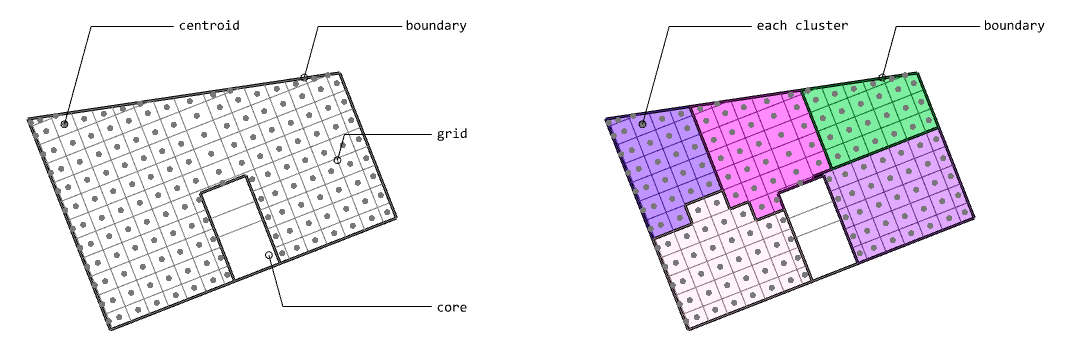 K-Rooms clustering key process, divided by 5
From the left, Grid and centroids creation · Divided rooms
        def _gen_grid(self):
            self.base_rectangles = [
                self.get_2d_offset_polygon(seg, self.grid_size)
                for seg in self.sorted_hall_segments[:2]
            ]

            counts = []
            planes = []

            for ri, base_rectangle in enumerate(self.base_rectangles):
                x_vector = (
                    rg.AreaMassProperties.Compute(base_rectangle).Centroid
                    - rg.AreaMassProperties.Compute(self.hall).Centroid
                )

                y_vector = copy.copy(x_vector)
                y_transform = rg.Transform.Rotation(
                    math.pi * 0.5,
                    rg.AreaMassProperties.Compute(base_rectangle).Centroid,
                )
                y_vector.Transform(y_transform)

                base_rectangle.Translate(
                    (
                        self.sorted_hall_segments[0].PointAtStart
                        - self.sorted_hall_segments[0].PointAtEnd
                    )
                    / 2
                )

                base_rectangle.Translate(
                    self.get_normalized_vector(x_vector) * -self.grid_size / 2
                )

                anchor = rg.AreaMassProperties.Compute(base_rectangle).Centroid
                plane = rg.Plane(
                    origin=anchor,
                    xDirection=x_vector,
                    yDirection=y_vector,
                )

                x_proj = self.get_projected_point_on_curve(
                    anchor, plane.XAxis, self.obb
                )

                x_count = (
                    int(math.ceil(x_proj.DistanceTo(anchor) / self.grid_size)) + 1
                )

                y_projs = [
                    self.get_projected_point_on_curve(
                        anchor, plane.YAxis, self.obb
                    ),
                    self.get_projected_point_on_curve(
                        anchor, -plane.YAxis, self.obb
                    ),
                ]

                y_count = [
                    int(math.ceil(y_proj.DistanceTo(anchor) / self.grid_size)) + 1
                    for y_proj in y_projs
                ]

                planes.append(plane)
                counts.append([x_count] + y_count)

            x_grid = []
            for base_rectangle, count, plane in zip(
                self.base_rectangles, counts, planes
            ):
                xc, _, _ = count

                for x in range(xc):
                    copied_rectangle = copy.copy(base_rectangle)
                    vector = plane.XAxis * self.grid_size * x
                    copied_rectangle.Translate(vector)
                    x_grid.append(copied_rectangle)

            y_vectors = [planes[0].YAxis, -planes[0].YAxis]
            y_counts = counts[0][1:]
            all_grid = [] + x_grid
            for rectangle in x_grid:
                for y_count, y_vector in zip(y_counts, y_vectors):
                    for yc in range(1, y_count):
                        copied_rectangle = copy.copy(rectangle)
                        vector = y_vector * self.grid_size * yc
                        copied_rectangle.Translate(vector)
                        all_grid.append(copied_rectangle)

            union_all_grid = rg.Curve.CreateBooleanUnion(all_grid, self.TOLERANCE)

            for y_count, y_vector in zip(y_counts, y_vectors):
                for yc in range(1, y_count):
                    copied_hall = copy.copy(self.hall)
                    copied_hall.Translate(
                        (
                            self.sorted_hall_segments[0].PointAtStart
                            - self.sorted_hall_segments[0].PointAtEnd
                        )
                        / 2
                    )

                    vector = y_vector * self.grid_size * yc
                    copied_hall.Translate(vector)
                    all_grid.extend(
                        rg.Curve.CreateBooleanDifference(
                            copied_hall, union_all_grid
                        )
                    )

            self.grid = []
            for grid in all_grid:
                for boundary in self.boundaries:
                    tidied_grid = list(
                        rg.Curve.CreateBooleanIntersection(
                            boundary.boundary, grid, self.TOLERANCE
                        )
                    )

                    self.grid.extend(tidied_grid)
            self.grid_centroids = [
                rg.AreaMassProperties.Compute(g).Centroid for g in self.grid
            ]
Finally, each room is connected with a hallway, which completes the process.
(The Dijkstra algorithm was implemented for the shortest-path computation.
The implementation is available at the following link, and a dedicated post on this subject will follow.)
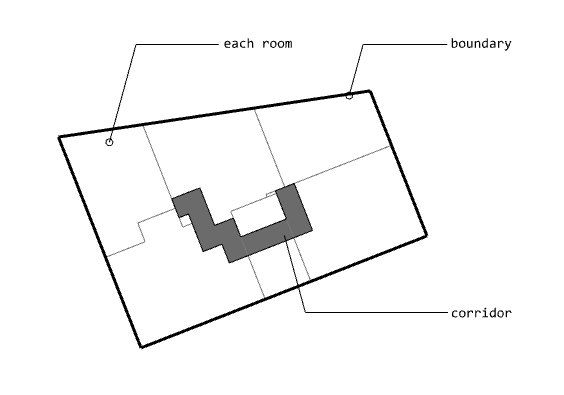 Corridor creation
Limitation of K-Rooms clusters
The K-Rooms Clusters algorithm implemented here is still incomplete. The images shown above are valid results when the K value is small.
As the K value increases and the number of rooms grows, a problem arises in which an architecturally appropriate shape cannot be derived, as shown in the example below:
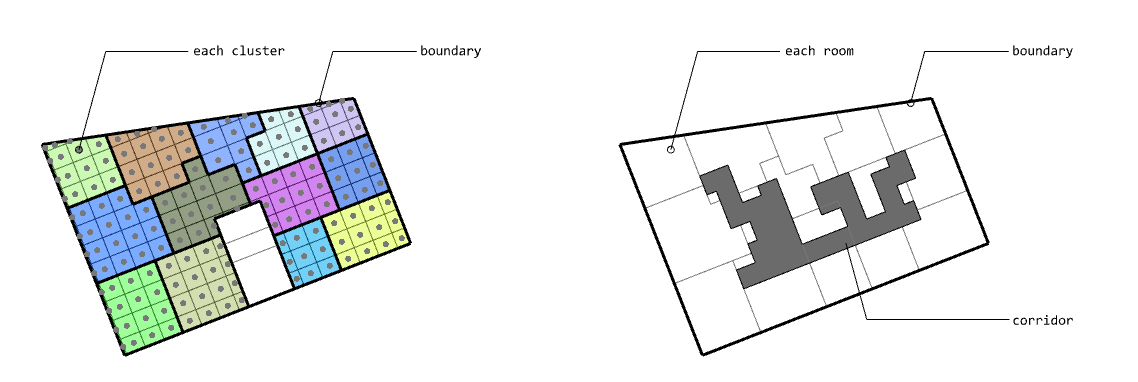 Improper shapes, divided into 13
From the left, K-Rooms · Result corridor
To address this problem, what remains is to define the appropriate shape and to create the logic that mitigates the issue through post-processing.
The complete code of K-Rooms clusters is available at this link.