Stable Diffusion is a deep learning, text-to-image model released in 2022.
It is primarily used to generate detailed images conditioned on text descriptions, though it can also be applied to other tasks such as inpainting, outpainting, and generating image-to-image translations guided by a text prompt.
 An image generated by Stable Diffusion based on the text prompt:
"a photograph of an astronaut riding a horse"
Using this model to create images makes it possible to obtain plausible rendered images quickly and easily from only a few lines of text.
This raises the question of how such a capability can be utilized in the field of architecture.
Several rendering engines are frequently used in architectural design, but they require precise modeling to produce high-quality renderings.
At the start of a design project, a very rough model or sketch can instead be passed to the model, together with text prompts, to obtain an early impression of the intended design.
A simple example is presented first.
The example below captures the Rhino viewport within Rhino's
GhPython environment
and then renders the image in the desired direction using
ControlNet of the stable diffusion API.
 Demo for using stable diffusion in Rhino environment
Prompt: Colorful basketball court, Long windows, Sunlight
First, code is required to capture the Rhino viewport.
The captured image is saved to the path where the current *.gh file is located.
    def capture_activated_viewport(
        self, save_name="draft.png", return_size=False
    ):
        """
            Capture and save the currently activated viewport
            to the location of the current *.gh file path
        """

        save_path = os.path.join(CURRENT_DIR, save_name)

        viewport = Rhino.RhinoDoc.ActiveDoc.Views.ActiveView.CaptureToBitmap()
        viewport.Save(save_path, Imaging.ImageFormat.Png)

        if return_size:
            return save_path, viewport.Size

        return save_path
Next, a local API server is run after cloning the
stable-diffusion-webui repository.
The
AUTOMATIC1111/stable-diffusion-webui
repository describes the settings required to run the local API server. Once these settings are complete, the desired methods can be invoked through API calls.
The API guide referenced here is available at
AUTOMATIC1111/stable-diffusion-webui/wiki/API
Python provides a built-in module called
urllib for handling HTTP.
The code for the API request used in the
GhPython environment is available at this
link.
    import os
    import json
    import Rhino
    import base64
    import urllib2
    import scriptcontext as sc
    import System.Drawing.Imaging as Imaging


    class D2R:
        """Convert Draft to Rendered using `stable diffusion webui` API"""

        def __init__(
            self, prompt, width=512, height=512, local_url="http://127.0.0.1:7860"
        ):
            self.prompt = prompt
            self.width = width
            self.height = height
            self.local_url = local_url

        (...)

        def render(self, image_path, seed=-1, steps=20, draft_size=None):
            payload = {
                "prompt": self.prompt,
                "negative_prompt": "",
                "resize_mode": 0,
                "denoising_strength": 0.75,
                "mask_blur": 36,
                "inpainting_fill": 0,
                "inpaint_full_res": "true",
                "inpaint_full_res_padding": 72,
                "inpainting_mask_invert": 0,
                "initial_noise_multiplier": 1,
                "seed": seed,
                "sampler_name": "Euler a",
                "batch_size": 1,
                "steps": steps,
                "cfg_scale": 4,
                "width": self.width if draft_size is None else draft_size.Width,
                "height": self.height if draft_size is None else draft_size.Height,
                "restore_faces": "false",
                "tiling": "false",
                "alwayson_scripts": {
                    "ControlNet": {
                    "args": [
                        {
                            "enabled": "true",
                            "input_image": self._get_decoded_image_to_base64(image_path),
                            "module": self.module_pidinet_scribble,
                            "model": self.model_scribble,
                            "processor_res": 1024,
                        },
                    ]
                    }
                }
            }

            request = urllib2.Request(
                url=self.local_url + "/sdapi/v1/txt2img",
                data=json.dumps(payload),
                headers={'Content-Type': 'application/json'}
            )

            try:
                response = urllib2.urlopen(request)
                response_data = response.read()

                rendered_save_path = os.path.join(CURRENT_DIR, "rendered.png")
                converted_save_path = os.path.join(CURRENT_DIR, "converted.png")

                response_data_jsonify = json.loads(response_data)

                used_seed = json.loads(response_data_jsonify["info"])["seed"]
                used_params = response_data_jsonify["parameters"]

                for ii, image in enumerate(response_data_jsonify["images"]):

                    if ii == len(response_data_jsonify["images"]) - 1:
                        self._save_base64_to_png(image, converted_save_path)
                    else:
                        self._save_base64_to_png(image, rendered_save_path)

                return (
                    rendered_save_path,
                    converted_save_path,
                    used_seed,
                    used_params
                )

            except urllib2.HTTPError as e:
                print("HTTP Error:", e.code, e.reason)
                response_data = e.read()
                print(response_data)

                return None


    if __name__ == "__main__":
        CURRENT_FILE = sc.doc.Path
        CURRENT_DIR = "\\".join(CURRENT_FILE.split("\\")[:-1])

        prompt = (
            """
                Interior view with sunlight,
                Curtain wall with city view
                Colorful Sofas,
                Cushions on the sofas
                Transparent glass Table,
                Fabric stools,
                Some flower pots
            """
        )

        d2r = D2R(prompt=prompt)

        draft, draft_size = d2r.capture_activated_viewport(return_size=True)
        rendered, converted, seed, params = d2r.render(
            draft, seed=-1, steps=50, draft_size=draft_size
        )

 Physical model
From the left, Draft view · Rendered view
Prompt: Isometric view, River, Trees, 3D printed white model with illumination

 Interior view
From the left, Draft view · Rendered view
Prompt: Interior view with sunlight, Curtain wall with city view, Colorful sofas, Cushions on the sofas, Transparent glass table, Fabric stools, Some flower pots

 Floor plan
From the left, Draft view · Rendered view
Prompt:
Top view,
With sunlight and shadows,
Some flower pots,
Colorful furnitures,
Conceptual image

 Skyscrapers in the city
From the left, Draft view · Rendered view
Prompt:
Skyscrapers in the city,
Night scene with many stars in the sky,
Neon sign has shine brightly,
Milky way in the sky

 Contour
From the left, Draft view · Rendered view
Prompt:
Bird's eye view,
Colorful master plan,
Bright photograph,
River

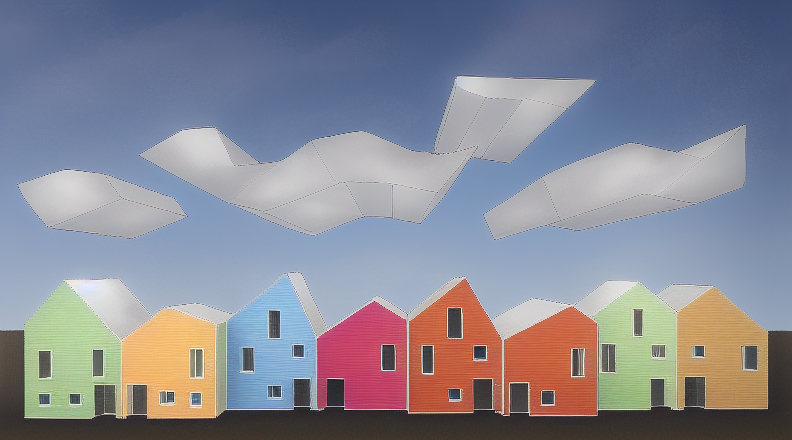 Gabled houses
From the left, Draft view · Rendered view
Prompt:
Two points perspective,
White clouds,
Colorful houses,
Sunlight

 Kitchen
From the left, Draft view · Rendered view
Prompt:
Front view,
Kitchen with black color interior,
Illuminations